send email
This block is part of the mssgs mail group and was last modified in core v15.0.1.
send email v15.0.1 Sends one email through mssgs mail. The message is queued (status: queued) and delivered by the mail platform; read its outcome with get message.
- flow
flow - connection required
mssgsmailconnection - subject required
valueThe subject of the e-mail.
- from
valueThe sender, on the API key's own domain : anything else is refused with
INVALID_FROM. A name can be set withName <email@example.com>. Empty uses the service provider's default from address. - reply to
valueReply-To address.
- to required
array1–50 recipients: addresses,
Name <email>strings or{email, name}objects. For more, use the batch block. - cc
arrayCC recipients.
- bcc
arrayBCC recipients.
- html required
valueHTML body. With a template set on this block, this is the inner content the template wraps.
- text version
valuePlain-text body. Empty strips the HTML version of its tags.
- tag
valueOptional tag for grouping messages in the mssgs mail activity view.
- metadata
objectOptional key/values stored with the message and returned by
get messageand the bounce webhook. - headers
objectOptional extra mail headers.
- masked
conditionFor content that must never be shown again : a login code, a reset link. mssgs mail overwrites the subject and bodies on its own record once the message is sent, so neither the activity view nor
get messagecan read them back.
- flow
flow - connection
mssgsmailconnection - success
condition - error
valueThe refusal as
CODE: message, e.g.RECIPIENT_SUPPRESSED,DOMAIN_CEILING,INVALID_FROM,INVALID_API_KEY. Empty on success. - response
object{message_guid, message_id, status}on success; the refusal body (withretry_afteron a 429) otherwise.
POST email on the mssgs mail transactional API. success=true means the platform ACCEPTED and queued the message (response.message_guid, response.message_id, response.status=queued) : not that it was delivered; a later bounce arrives through the domain webhook and get_message. `from` must be on the API key's sender domain or the API answers INVALID_FROM; empty `from` falls back to the provider's default from address. `to` takes 1–50 recipients. `text` defaults to the html with tags stripped. error carries `CODE: message`; codes worth branching on: RECIPIENT_SUPPRESSED (a recipient bounced before), DOMAIN_CEILING and RATE_LIMITED (response.retry_after seconds), INVALID_API_KEY. masked=true makes the platform erase subject and bodies from its own record after sending : use it for login codes and reset links. Suppressed in a simulation: no mail leaves in a dry run.
mssgsmail |
mssgs mail |
email |
mail |
transactional |
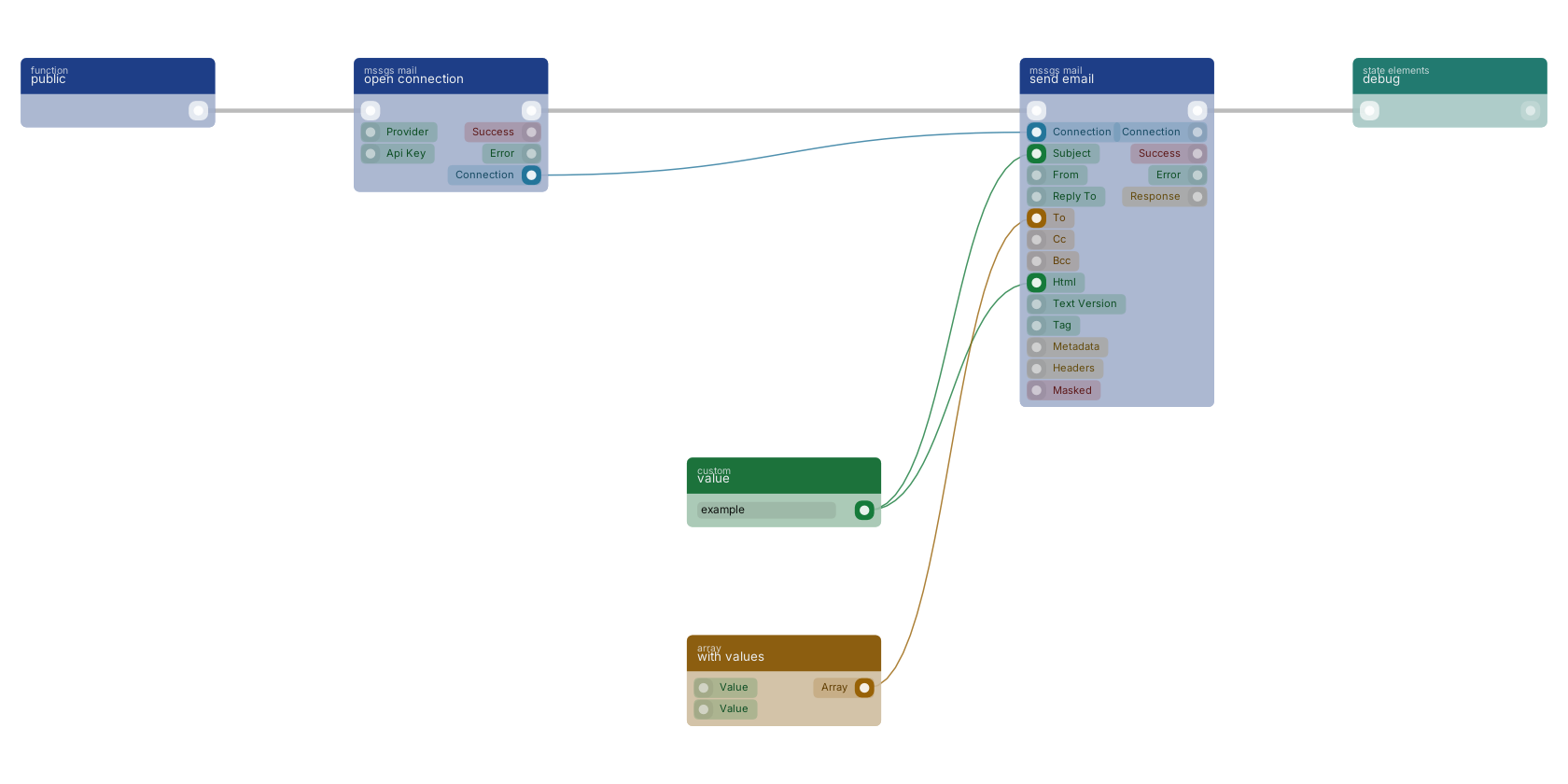
A typical wiring for send email: a function trigger starts the flow; open connection feeds the connection pin; value feeds the subject pin; with values feeds the array_to pin; value feeds the html pin; the flow out pin feeds debug.
Version history
Introduced in v15.0.1.
Back to
mssgs mail Return to the main group to view all sub-groups Back to mssgs mail Return to the group to view all blocks within this group