Building AI Endpoints
Add Claude to a blueprint: create an Anthropic connection, send messages from an API flow, force structured JSON replies, stream to the browser, control cost, and run bulk work as batches.
This tutorial builds an AI-backed endpoint: a POST API that takes a text, asks Claude, and replies with clean JSON. It assumes you can already register an endpoint and reply in JSON; if not, do Build Your First API first. You need an Anthropic API key.
1. The Connection
Every Claude block takes a connection pin. Create it once per flow with function_create_anthropicconnection (open connection):
api_key: your Anthropic key. Keep it out of the canvas by storing it as a system setting and reading it withvalue_get_system_key_select(get setting).default_model: the model every message uses unless the block overrides it.daily_cap_usdandconcurrency_cap: hard guardrails on spend and parallel calls, enforced by the connection itself.
The block has a success condition pin and an error value pin. Branch on them: a message sent without a working connection fails further down the flow.
2. Request to AI to JSON Reply
The dominant API shape in RUAL blueprints works for AI too: a trigger runs the chain, the connection and prompt feed the message block, and a JSON reply answers the caller. The prompt here is the text field of the request body, read with httpconnection_get_body (get body) and object_field_getter_multiple (get fields).
The standard AI endpoint shape: a function trigger runs the chain, open connection creates the Anthropic connection, and send message asks Claude with the request body text as the prompt, read off the body by get fields. An output template on the output_schema pin keeps the answer valid JSON, and reply in JSON returns it to the caller with a 200.
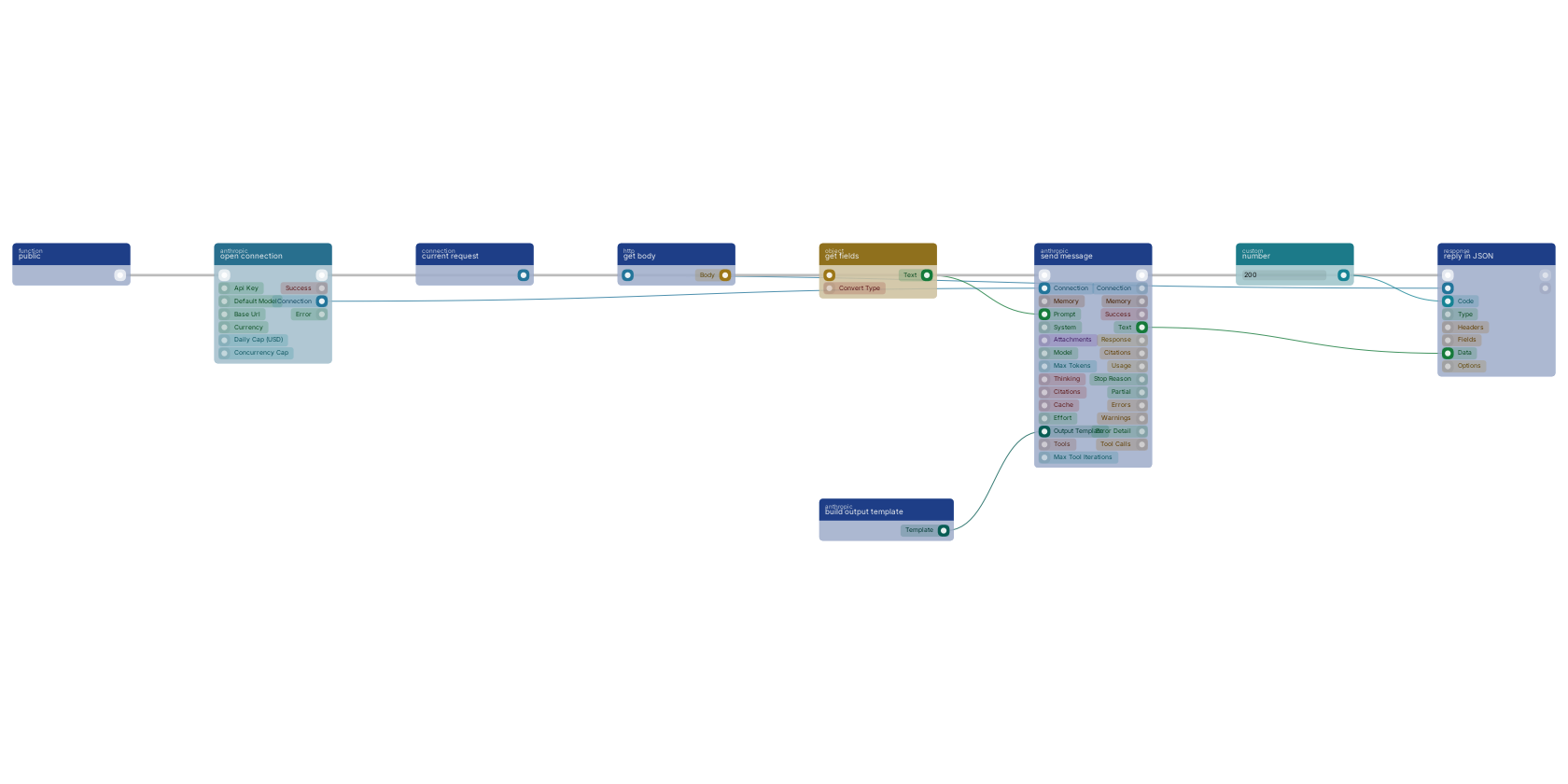
On the canvas: anthropicconnection_message (send message) takes the connection, the prompt and an optional system text, and outputs the reply as text plus token usage and a stop_reason. httpconnection_set_json (reply in JSON) sends the answer back with status 200. Always branch on the message block's success pin and reply with an error body on the false path, following the pattern in Error Handling.
3. Structured JSON Replies
Free text is hard to process further. Two blocks turn the reply into dependable data:
anthropicconnection_build_schema(build output template): pick the fields Claude should return and describe each one, no JSON Schema knowledge needed. Wire its output to the message block'soutput_schemapin and the reply text is valid JSON in that shape.anthropicconnection_parse_json(parse JSON): recovers and parses JSON from messy text (code fences, prose around the object, truncation) without an API call. It reportsrepairedwhen it had to fix the input, so you can log how often that happens.
With an output template wired, the text pin already parses cleanly; keep the parse block as the safety net before you feed the reply into object blocks or storage.
4. Streaming to the Browser
anthropicconnection_message_stream (stream message) sends the same prompt but pushes the reply token by token to a WebSocket channel while it generates, then returns the full text when done. Use it for chat-like pages where waiting for the whole answer feels broken; use the plain message block everywhere else, it is simpler to debug.
5. Classify and Route
anthropicconnection_classify (classify) sorts an input into exactly one of your labels, with a matched condition for "none of them fit". Feed the label into a value_switch (switch) to route support tickets, form submissions or webhook payloads down the right branch without writing conditions by hand.
6. Tools, Claude Calling Your Functions
Tools let Claude call back into your blueprint while it composes an answer. Build one with anthropicconnection_build_tool (build tool): name, description, parameters as a schema, and the function that runs when Claude calls it. Combine tools with anthropicconnection_tool_multiple (multiple), pick one conditionally with anthropicconnection_tool_branch (tool if) or anthropicconnection_tool_switch (tool switch), and wire the result to the message block's tools pin. Ready-made tools cover web search (anthropicconnection_tool_web_search) and code execution (anthropicconnection_tool_code_execution). The max_iterations pin caps how many tool round trips one message may make.
7. Cost Control
anthropicconnection_count_tokens(count tokens) prices a prompt before you send it: input tokens, estimated total cost, free to call. Gate expensive calls on it.anthropicconnection_preflight(preflight document) converts a PDF, image or spreadsheet to clean Markdown with a cheap model, so the expensive model reads far fewer tokens.anthropicconnection_preflight_batchdoes the same for a list of files.- The message block's
cachepin reuses earlier context instead of paying for it again, andanthropicconnection_get_usage(get usage) reports total spend per connection. - The connection's daily cap is the last line of defense: set it on every production blueprint.
8. Bulk Work as Batches
anthropicconnection_batch_create (create batch) submits many prompts as one asynchronous batch at half the standard price, with results within 24 hours. Wire its on_finished function pin to be called when the batch completes (the system polls in the background), or poll yourself with anthropicconnection_batch_get (get batch) from a scheduled flow. Batches are the right shape for nightly enrichment, classification backfills and report generation; anything the user waits for belongs in a plain message call.
Notes From Practice
- Long AI calls belong behind the queue: hand the work to
function_custom_execute_from_queue(execute in queue) and reply to the caller immediately. See Queue. - Expose AI endpoints with a scope and a rate limit; an unprotected
/api/askis an open wallet. See Remote Access Control. - Conversations that remember earlier turns use the memory blocks (
anthropicconnection_create_memoryand friends) on the message block'smemorypin.
Frequently asked
How do I call Claude from a RUAL blueprint?
Create a connection with function_create_anthropicconnection using your Anthropic API key, then wire that connection to anthropicconnection_message with your prompt. The message block returns the reply text, token usage and a success condition to branch on.
How do I get structured JSON from Claude in RUAL?
Build an output template with anthropicconnection_build_schema, describing each field Claude should return, and wire it to the message block's output_schema pin. The reply text is then valid JSON in that shape, and anthropicconnection_parse_json repairs any malformed output without another API call.
How do I control what Claude costs in a RUAL blueprint?
Set a daily_cap_usd on the Anthropic connection as a hard limit, price a prompt before sending it with anthropicconnection_count_tokens, and convert documents to Markdown with the cheaper preflight block before sending them to an expensive model. Bulk work goes through anthropicconnection_batch_create at half the standard price.