Building a Login Page
Passwordless login in two small API flows: email a login code, verify it into a session token, and the form page that ties them together.
This tutorial builds passwordless login, the shape real RUAL applications use most: the visitor enters an email address, receives a one-time code, and trades it for a session. No passwords to store, no reset flow to maintain. It assumes you can register an endpoint and reply in JSON; if not, do Build Your First API first.
1. Request the Code
The first endpoint takes an email address and sends the code. Register a POST URI with on_startup_register_uri_post (on api post), read the body with httpconnection_get_body (get body), and lift the email off it with object_field_getter_multiple (get fields). Normalize the address before you use it: value_trim and value_to_lowercase keep Ada@Example.com and ada@example.com from becoming two accounts.
function_user_request_passwordless_code (request passwordless login code) takes the address as identifier with identifier_type set to email, generates the code and mails it. The code itself is never exposed to the flow: there is nothing to log or leak.
A function trigger runs the endpoint: the request body is read with get body, get fields takes the email off it, and request passwordless login code mails the code. A branch on the success pin decides between a 200 reply and a 400, both sent with reply in JSON.
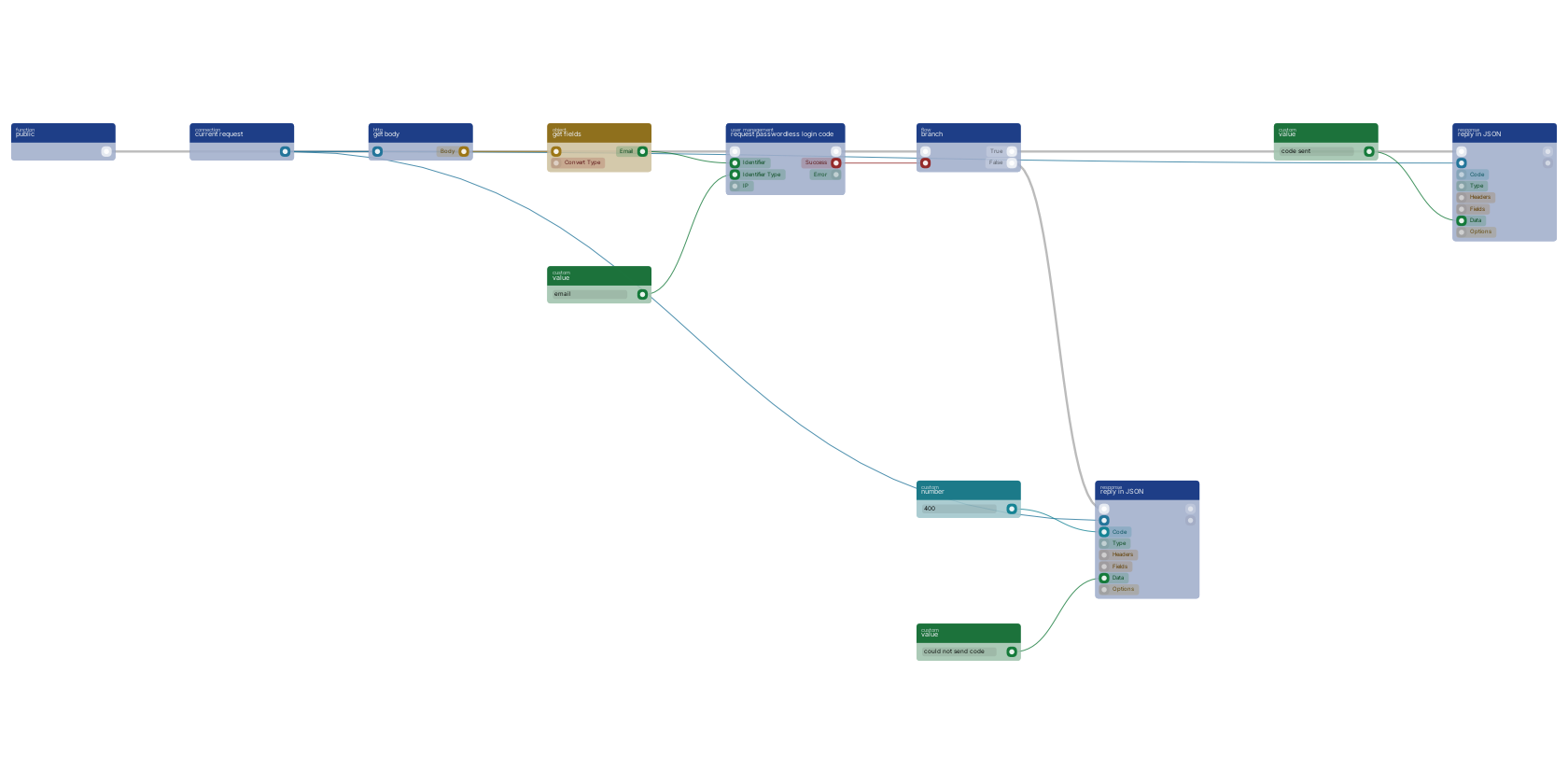
Branch on the block's success pin and answer both paths with httpconnection_set_json (reply in JSON), as on the canvas above. Keep the failure reply vague on purpose: a precise error like "no account with this email" tells a caller exactly which addresses have accounts.
2. Verify the Code Into a Session
The second endpoint takes the email address and the code, and signs the user in with function_user_signin (sign in): the address goes to user_id, the submitted code to password, and an expiry_date built with date_currentdate plus date_add_days sets how long the session lives. On success the block outputs the accesstoken and the user object; reply with both, so the caller stores the token and sends it on every later request (see Adding tokens to your requests).
Two details of the sign-in block are worth knowing up front:
- Its
errorpin distinguishes a wrong code from other failures; log it withfunction_console_log(log), but reply with a generic 401. - Accounts with two-factor authentication enabled get
need_2fatrue plus the available2fa_methods, so the same endpoint can hand the login off to your second-factor step.
3. The Page Side
The login page itself is a state page: state_form (form) with two state_input (input) fields collects the email address and later the code, and the submit action calls your functions. Read what was submitted with state_form_get (get form data), validate before calling the endpoint (the form validation pattern), and store the token from the verify reply in the page state. A full account system with registration, roles and gated pages is walked through in Building User Authentication.
Notes From Practice
- Scope both endpoints
*public(a login page is the one thing nobody is logged in for) and put a rate limit on them; the request-code endpoint sends email, so it is a spam vector. See Remote Access Control. - The request block deliberately bypasses the built-in rate limit so a code can be sent right after account creation; your own throttle is the only brake.
- Prefer a classic password flow? The same two-endpoint shape fits
function_user_request_password_reset_tokenandfunction_user_reset_password_with_token; search those type names in the editor to add them. - Every reply path matters here more than anywhere: an unanswered login attempt looks like a hung page, not an error.
Frequently asked
How do I build a passwordless login in RUAL?
Two endpoints: one takes the email address and calls function_user_request_passwordless_code, which mails a one-time code without ever exposing it to the flow. The second takes the address plus the code and calls function_user_signin, which returns an access token and the user object on success.
How do I set how long a RUAL login session lasts?
The sign-in block takes an expiry_date pin. Build it with date_currentdate plus date_add_days, for example seven days, and the issued access token stays valid until that date.
Does RUAL login support two-factor authentication?
Yes. When an account has two-factor enabled, function_user_signin returns need_2fa true plus the available 2fa_methods, so the login endpoint can hand off to your second-factor step before issuing the token.