Trigger Reference
The 32 blocks that start a flow when a device reports something. Three rules decide how often they fire: transitions fire on the change, thresholds fire on the crossing, and an unknown previous value seeds instead of firing.
A trigger block has a flow OUT pin and no flow IN pin. The device event dispatcher seeds its out pins and starts the flow from there, the same way a schedule block works.
Every trigger fires only for adopted devices. The single exception is device discovered, whose purpose is to notice devices that are not adopted yet.
Three rules decide how often a trigger fires
Transition triggers fire on the change, not on every report
A motion sensor re-announces occupancy: true every thirty seconds or so while a person is in the room, and a power meter reports every ten seconds whether or not anything changed.
Every binary trigger requires the value to have changed. So presence detected in a hallway with somebody standing in it fires once, on entry.
The exception is a momentary capability: button presses, doorbell rings, access entries, NFC swipes and camera motion. A pulse has no meaningful "unchanged", so every occurrence fires, including an identical repeat.
Threshold triggers fire on the crossing, not on the level
temperature changed with above = 25 fires once, when the room passes 25 °C. It fires again only after the reading has gone back below 25 and crossed up again. The exact test: the new reading is above the threshold, and the previous one was at or below it.
- A first-ever reading above the threshold counts as a crossing. Staying silent until the second reading would mean a node restart swallows an alarm.
- Neither
abovenorbelowturns the threshold off: the trigger fires on every changed reading. - Both fires on either crossing.
- 0 is a legitimate threshold. Leaving a pin empty is what turns it off, not setting it to zero.
An unknown previous value seeds instead of firing
When the node has no previous value for a capability, an incoming reading is recorded without counting as a transition. Nothing fires; the value is simply learned. Otherwise a routine restart would become a burst of "door opened" and "light turned on" for things that did neither.
- Three exceptions fire anyway:
smoke,gasandwater_leak. A duplicate "smoke detected" is an annoyance; a missed one is the thing the sensor exists to prevent. - Occupancy, contact and vibration do not. They are what a restart most often finds mid-state, and nothing catastrophic follows from learning about them one report late.
- Momentary capabilities are unaffected: they have no persistent state to seed.
You will rarely see this, because last-known state is restored from Redis before the adapters connect. The rule covers a fresh install, a flushed Redis and a device heard from for the first time. See What Survives a Restart.
Every trigger has the same shape
Two in-pins narrow which devices a trigger listens to, and both are optional.
| In-pin | Effect |
|---|---|
device | Only this device. Accepts the platform id, the native id or the exact device name. Leave it empty and the trigger fires for every matching device, which is what makes one block able to be the whole-house version. |
room | Only devices in this room, compared case-insensitively. Empty means every room. |
Out-pins are identical on all of them, and the two access-entry triggers add three more:
| Out-pin | Type | Carries |
|---|---|---|
flow | flow | The chain to run. |
device | object | The whole device: id, name, room, type, capabilities, current state. Branch on model or battery without a second block. |
device id | value | The stable platform id, ready to feed another block's device pin. |
name | value | The friendly name, ready to put in a message. |
room | value | The device's room, empty if none. |
type | value | sensor, light, switch, climate, cover, lock, button, door or camera. |
capability | value | Which capability changed. The pin to branch on when using the catch-all trigger. |
value | value | The new value. |
previous | value | The value before this change. Empty on the first report. |
at | number | Unix seconds the device reported. |
actor | value | Access granted and access denied only. Who: the user or credential name, empty when the reader could not identify them. |
method | value | Access triggers only. How: nfc, pin, wave, mobile, touchpass or manual. |
granted | condition | Access triggers only. True when access was allowed. |
Sensors: any binary capability
| Block | Fires when |
|---|---|
sensor activated |
Any sensor capability transitions false to true: motion detected, a door opened, water found, smoke detected, gas detected, vibration. The extra sensor type pin narrows it to one of occupancy, contact, water_leak, smoke, gas, vibration; empty means any of them. |
sensor deactivated |
The mirror: a sensor capability transitions true to false. |
- "Sensor" means the binary capabilities that describe the world. It excludes
power, which has its own light and switch triggers, andtamperandbattery_low, which are device health. Foldingpowerin would make every whole-house sensor flow fire on its own lighting changes and livelock. - A motion sensor clears after its own configured stillness timeout, often 60 to 120 seconds, so
sensor deactivatedfires when the sensor says clear, not when the room empties.
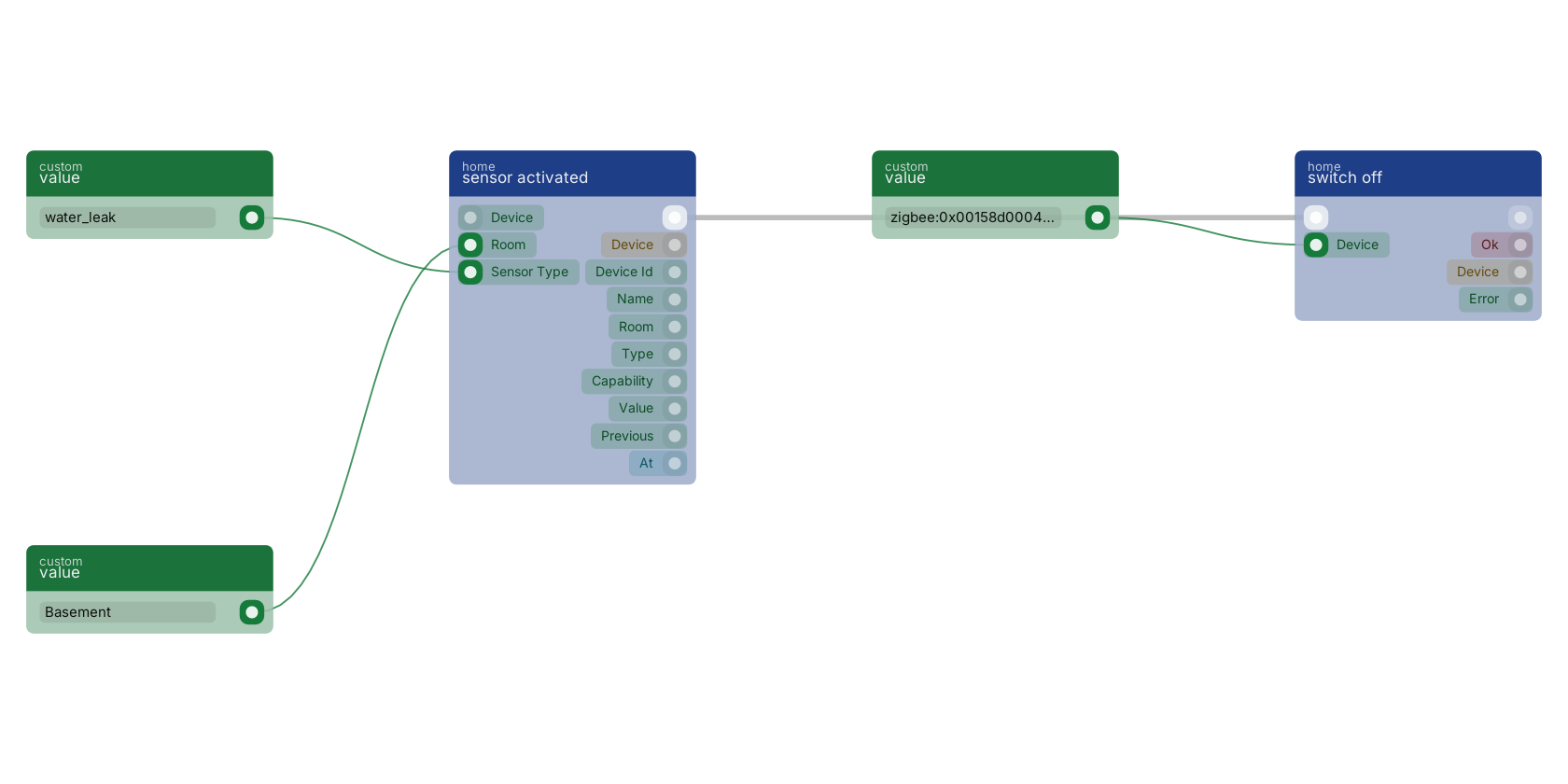
sensor activated starts the flow when a sensor turns ON, and the two value blocks are what narrow it: sensor type keeps it to leak detectors, room keeps it to the basement. Both are optional, and leaving them empty makes this one block the whole-house version. It fires on the TRANSITION, so a sensor sitting in a puddle and re-reporting fires the flow once, and the flow shuts the valve with switch off.
Presence and contact
| Block | Fires when |
|---|---|
presence detected |
occupancy goes false to true. Equivalent to sensor activated with the sensor type set to occupancy. |
presence cleared |
occupancy goes true to false. The delay before this fires is the sensor's, not the platform's. |
contact opened |
contact goes true, which means open. Zigbee and Matter both report contact true for a closed door on the wire; that inversion is corrected at the adapter, so value here is true when the door is open. |
contact closed |
contact goes false, meaning closed. |
Alarms: leaks and smoke
| Block | Fires when |
|---|---|
water leak detected |
water_leak transitions to true. On the transition, so a sensor sitting in a puddle and re-reporting fires once. |
smoke detected |
smoke transitions to true. |
sensor activated with the sensor type set to gas. Lights and switches
| Block | Fires when |
|---|---|
light turned on |
A device classified as a light transitions power false to true. |
light turned off |
The same device type transitions power true to false. |
switch turned on |
A device classified as a switch transitions power false to true. |
switch turned off |
The same, true to false. |
- These fire for changes RUAL did not make: a physical wall switch, the Hue app, a scene fired by a dimmer. A flow that turns a light on in response to a light turning on is a loop.
- The light and switch split follows the derived device type. A device with on/off but no brightness or colour is a switch, so metering plugs land here even when the vendor announces them as lights.
Buttons and scene controllers
| Block | Fires when |
|---|---|
button pressed |
Any momentary control emits an action: Aqara buttons, Hue dimmers, scene switches. Fires on every press, including a repeat of the same press type. |
Branch on the value pin to tell single from double from hold. The exact strings are the device's own. Common ones are single, double, hold and release, but a four-button remote sends things like 1_single and a Hue dimmer sends initial_press and long_release. Press the button once with the Zigbee2MQTT frontend open, or read the device state through get device, and use what it actually sends.
Environment readings cross thresholds
| Block | Extra pins | Fires when |
|---|---|---|
temperature changed |
above, below, in °C |
The temperature capability changes. With a threshold set, only on the crossing. |
humidity changed |
above, below, in % |
The humidity capability changes. Same crossing semantics. |
Other numeric capabilities have no dedicated trigger. For illuminance, CO₂, power draw or a blind's position, use device state changed and branch on the capability pin, or read the value with get device state inside a flow another trigger started. The threshold-crossing behaviour is specific to these two blocks.
Device health and the fleet
| Block | Fires when |
|---|---|
battery low |
The battery percentage crosses below the below % pin, default 20, or the device raises its own battery_low flag. |
device unavailable |
A device transitions to unreachable: a flat battery, out of range, a bulb switched off at the wall. It does not repeat while the device stays away. There is no matching "device came back" trigger; use get status or a periodic get all devices sweep if you need one. |
device discovered |
A new device appears on the radio, before it is adopted. Fires once per device, the first time it is ever seen. The one trigger that fires for unadopted devices. |
device adopted |
A device is taken into service, whether by the API, the studio or a flow calling device adopt. Use it to set a room, apply defaults or announce the new device. |
The catch-all: any capability that changes
| Block | Fires when |
|---|---|
device state changed |
Any capability of any adopted device changes. |
High volume by design. A house with a dozen sensors produces hundreds of these an hour. Use it for logging, and for capabilities that have no dedicated trigger, then branch on the capability pin. Where a specific trigger exists, use that: it is cheaper and it says what it means on the canvas.
Doors, access control and cameras
These twelve come with the UniFi Access and Protect adapter: when someone rings, when a card is swiped, when the gate opens, when an unknown card is refused at three in the morning.
| Block | Extra pins | Fires when |
|---|---|---|
doorbell rang |
Somebody rings a doorbell or door station, from a UniFi door station or a Protect doorbell camera. Momentary: there is no "still ringing" state. | |
door or gate opened |
door_position transitions to true, meaning open. This is the physical position, not the lock: a door can be unlocked and shut. |
|
door or gate closed |
door_position transitions to false. Pair it with a delay for "the gate has been open too long". |
|
door or gate unlocked |
lock_state transitions to unlocked: the electrical state of the lock, whether or not the door then opens. A momentary unlock fires this, then fires door or gate locked seconds later when the relay re-locks. |
|
door or gate locked |
lock_state transitions to locked. Because a momentary unlock re-locks on its own, this fires routinely after every granted entry, not only when somebody locks up. |
|
gate opened |
door_position becomes true for a gate. The same mechanism as door or gate opened, for gate automations. Select the gate in the device pin: with no device it fires for any door-type device. |
|
gate closed |
door_position becomes false for a gate. The natural pair for "the gate has been open too long": start a timer on gate opened and cancel it here. |
|
access granted |
method |
Somebody is let in: a valid card, PIN, wave or mobile credential. The method pin narrows it to one of nfc, pin, wave, mobile, touchpass. Does not fire on a refusal. |
access denied |
Somebody is refused: an unknown card, a wrong PIN, a credential outside its schedule. | |
NFC card swiped |
card |
A card or fob is presented, regardless of the decision that follows. The card pin narrows it to one token or actor. |
camera motion detected |
A UniFi Protect camera detects motion. One event per detection, not a sustained state. | |
security alarm activated |
The controller's own alarm transitions to active. Distinct from the smoke, gas and leak triggers, which are individual detectors. |
- The two entry triggers carry three extra out-pins:
actor(the user or credential name, empty when the reader could not identify them),methodandgranted. - Swiped and granted are different questions.
NFC card swipedfires when the card is presented, before and regardless of the decision: "when my gym fob is tapped, turn on the porch light".access grantedfires only when somebody is let in. A refused card fires the first and not the second. - Doorbell, NFC, entry and camera motion events are momentary. Every occurrence fires, including the same card presented twice in a row.
- Lock state is not door position. A door can be unlocked and still shut, or wedged open while the relay says locked. Pick the trigger that asks the question you mean.
Dispatch is in process and capped at 16 runs
- Dispatch is in process, not queued. Every other trigger in RUAL goes through the queue, which buys durability at the cost of a write and a poll interval. Here the light has to come on before you have finished walking through the door. A node restart drops in-flight triggers.
- The trigger index is cached, not searched per event. It is built at startup, before the adapters connect, so the first motion event after a restart is not dropped. It is rebuilt when you save a blueprint, so a studio edit takes effect without a restart.
- Only active trigger blocks in saved blueprints are indexed.
- Concurrent runs are capped at 16. Beyond that, events are dropped with a warning in the log rather than queued: a backlog of stale "turn the light on" commands is worse than none. Hitting the cap usually means a flow is slow.
Next steps
Action Reference The 24 blocks that command devices and query the registry. Example Flows These triggers wired into complete automations. Troubleshooting When a trigger does not fire, start here.Frequently asked
Does a RUAL motion trigger fire every time the sensor reports?
No, it fires on the change. A motion sensor re-announces occupancy every thirty seconds or so while somebody is in the room, and the trigger requires the value to have changed, so the flow runs once, on entry. Button presses are the deliberate exception, because a momentary pulse has no meaningful unchanged state.
How does a temperature threshold trigger work in RUAL?
It fires on the crossing, not the level. A trigger set to above 25 fires once when the room passes 25 degrees, not once per reading for the rest of the afternoon, and it fires again only after the reading has dropped back below 25 and crossed up again. A first-ever reading above the threshold counts as a crossing.
How do I write one RUAL automation for every sensor in a room?
Leave the trigger's device pin empty and set its room pin. The device pin is optional precisely so that one block can be the whole-room or whole-house version; requiring it would force one flow per sensor.