Action Reference
The 24 blocks that command a device or ask the registry a question: lights, switches, climate, doors and gates, the generic capability write, the queries that cost nothing, and fleet management from a flow.
An action block has a flow IN pin, which is what distinguishes it from a trigger: it is reached by the flow walk and sits in the middle of a chain like any other block.
What Every Command Block Shares
Blocks that address one device take a device pin: the platform id, the native address, or the exact device name. When the studio's device picker ships, a device selected there is used when the pin is empty, and the pin always wins. If neither is set the block reports HOMEASSIST_DEVICE_REQUIRED rather than guessing: "turn off the light" with no light named is not a whole-house command, it is a mistake.
Command blocks report the same four out-pins:
| Out-pin | Type | Carries |
|---|---|---|
flow | flow | Continues whether the command succeeded or not. |
ok | condition | True when the command reached the device. |
device | object | The device the command was sent to. |
error | value | Empty on success, otherwise a code plus the detail. |
Branch on ok, not on an error handler. A command to an unreachable bulb is an ordinary event in a house, not an exceptional one, and forcing every lighting flow through error handling for a bulb somebody switched off at the wall would make them all unreadable.
Do not branch on the returned device state. Hue and Daikin confirm synchronously, so their snapshot already reflects the command. Radio adapters do not: the Zigbee bulb has been told, and its own report arrives a moment later, so the snapshot you get back is the pre-command one. That is exactly why ok exists.
Error Codes
| Code | Means |
|---|---|
HOMEASSIST_NOT_AVAILABLE | This node has [homeassist] enabled = false. Reported on the error pin rather than thrown, so a flow that runs on both a Nano and a cloud node can branch on it instead of blowing up. |
HOMEASSIST_DEVICE_REQUIRED | No device pin and no picked device. |
HOMEASSIST_DEVICE_NOT_FOUND | Nothing resolved from that id, native id or name. |
HOMEASSIST_DEVICE_NOT_ADOPTED | The device exists but is not in service. See Discovering and Adopting Devices. |
HOMEASSIST_CAPABILITY_UNSUPPORTED | The device never announced that capability, so nothing was sent to the radio. |
HOMEASSIST_ADAPTER_REQUIRED | pairing open with no adapter named. |
HOMEASSIST_ADAPTER_NOT_FOUND | That adapter is not configured on this node. |
HOMEASSIST_COMMAND_REJECTED | The device or its daemon refused the command. |
HOMEASSIST_PAIRING_UNSUPPORTED | That adapter has no inclusion mode. Daikin units join by WiFi; UniFi devices are enrolled in the UniFi app. |
HOMEASSIST_NOTHING_TO_SET | climate set with none of mode, temperature or fan wired. |
HOMEASSIST_HISTORY_NOT_AVAILABLE | Home automation is on but analytics is off. |
The error string carries the code and the detail, for example HOMEASSIST_DEVICE_NOT_FOUND: zigbee:0x1234. The detail is the half you actually need when reading a flow trace.
Lights
| Block | Pins beyond device | Does |
|---|---|---|
light on |
brightness %, kelvin, colour |
Turns the light on, applying everything set in one command. Unset pins leave the lamp's current value alone. |
light off |
Turns it off. No side effects beyond the power state: brightness and colour are remembered by the lamp and restored when it is next turned on. | |
light toggle |
Reads the current power state from the registry and sends the opposite. | |
light dim |
brightness % |
Sets brightness without changing anything else. |
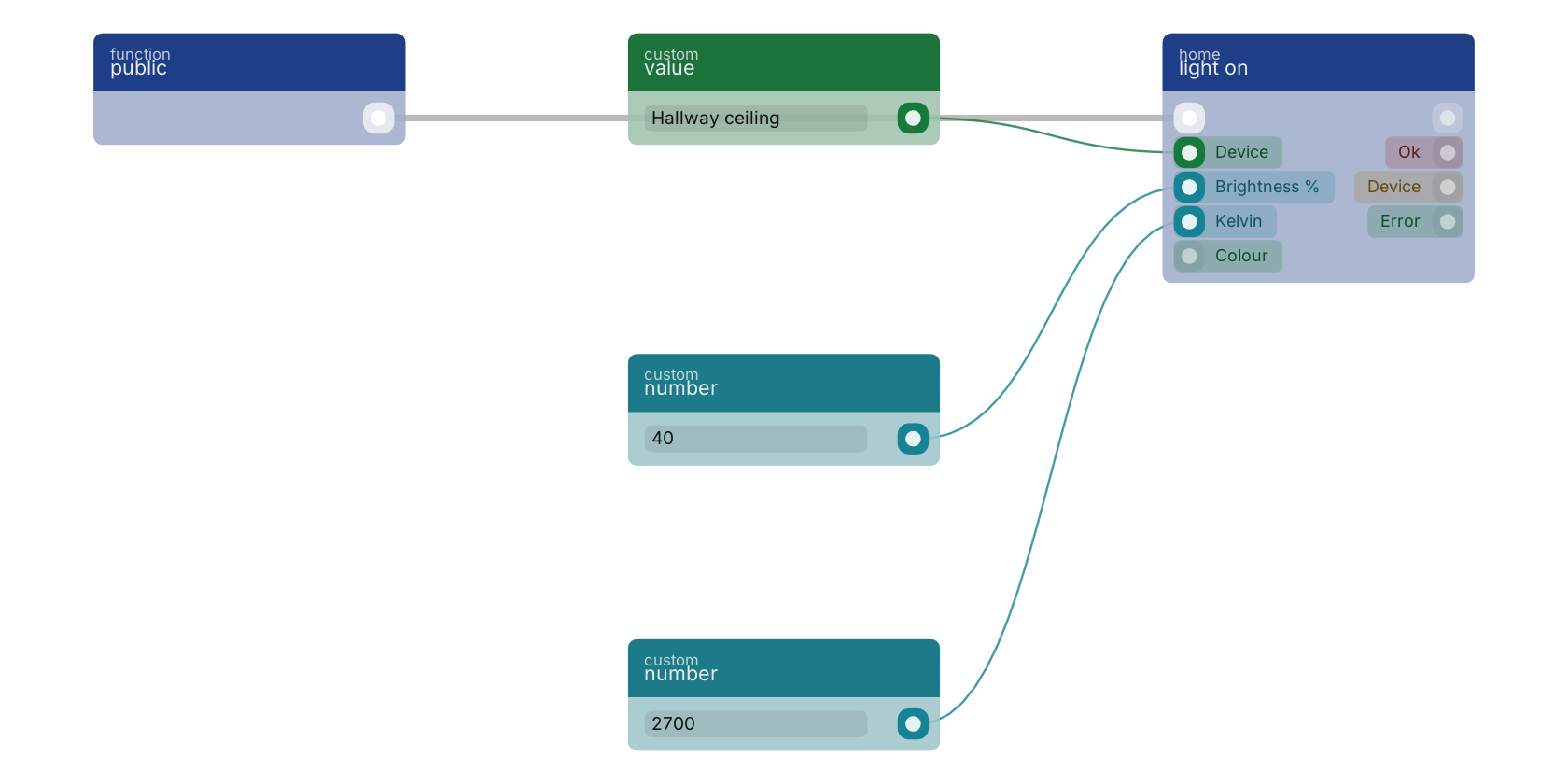
One command, not three. Sending power, then brightness, then colour as separate messages makes the bulb apply each as it arrives, so it visibly jumps to full white before settling. Batching them is why light on carries those pins instead of expecting three blocks in a row.
Kelvin, not mireds. 2200 candle, 2700 warm white, 4000 neutral, 6500 daylight. The adapters convert.
Toggle decides rather than fails when the state is unknown. Last-known state is restored at boot, so this is rarer than it used to be, but a lamp nobody has heard from since it was adopted still has no power state. A toggle that errors because the platform does not know is useless to the person standing in a dark room, so unknown means on.
light dim implies power. Setting a brightness on a lamp that is off turns it on at that brightness rather than storing it for later, and setting 0 turns it off. Use light off when off is what you mean; it reads better on the canvas.
light on carries brightness, colour temperature and colour on its own pins, and sends every value that is set in ONE command, so the lamp transitions once instead of visibly stepping through full white first. Brightness is a percentage and colour temperature is in KELVIN, not mireds: 2200 candle, 2700 warm white, 6500 daylight. The device pin takes a platform id, a native address or an exact device name.
Switches
| Block | Does |
|---|---|
switch on | Sets power true on a device classified as a switch. |
switch off | Sets power false. |
Identical on the wire to light on and light off. They are separate blocks because pickers and flows read better when plugs are not offered as lights, and because a metering plug classifies as a switch even when its vendor announces it as a light.
Climate
| Block | Pins | Does |
|---|---|---|
climate set |
mode, target °C, fan |
Commands a Daikin air conditioner over its local API, or a Zigbee, Z-Wave or Matter thermostat over the radio. |
- Mode is one of
off,auto,cool,heat,dry,fan. Setting anything other thanoffimplies switching the unit on: an author who says "heat" and gets a unit that stays off has been given a puzzle, not a feature. - Fan is
auto,silent,low,medium,highorturbo. Devices with fewer speeds get the nearest they have. - Empty pins keep the current value, and wiring none of the three reports
HOMEASSIST_NOTHING_TO_SETrather than claiming a command was sent. - Everything goes in one command for the same reason as lights. On Daikin that means a read-modify-write of the whole control block, because its API rejects partial updates and resets any field you omit.
Doors and Gates
These four command an access-controlled door through the UniFi adapter.
These four are not yet released
They are not in a released Core build yet, so they have no block pages here; those appear once the blocks do.
| Block | Pins beyond device | Does |
|---|---|---|
door unlock |
stay unlocked |
Releases the lock. By default this is a momentary unlock: the controller holds the relay open for its configured time and then re-locks. |
door lock | Locks the door. | |
gate open | Opens a gate or garage door. | |
gate close | Closes it. |
Momentary is the default because the alternative is a security footgun. "Buzz someone in" is the common case, and a block that left the front door unlocked until something else remembered to lock it would eventually leave it unlocked overnight. Set stay unlocked when you genuinely mean until further notice, and pair it with a door lock somewhere.
All four resolve to a single lock_state write, because that is what an access controller exposes: a relay. They exist as four blocks so the canvas and the picker read the way a person thinks. On a single-relay gate that toggles, gate open and gate close are the same pulse and the controller decides the direction from the gate's current position.
door_position is read-only: it is a sensor, not a command. Writing it returns HOMEASSIST_CAPABILITY_UNSUPPORTED rather than failing silently.
The Escape Hatch
| Block | Pins | Does |
|---|---|---|
device set |
capability, value |
Writes any capability by name. |
This is how you reach a blind's position, a plain lock's lock_state, or anything else in the vocabulary that has no dedicated block. Values are coerced to what the device wants, and the capability name is normalised, so "motion" and "on_off" resolve rather than failing.
What is not forgiven is a capability the device never announced: that returns HOMEASSIST_CAPABILITY_UNSUPPORTED without touching the radio. Silently sending an attribute a device does not implement is how you get a bulb that stops responding until it is power-cycled.
Queries
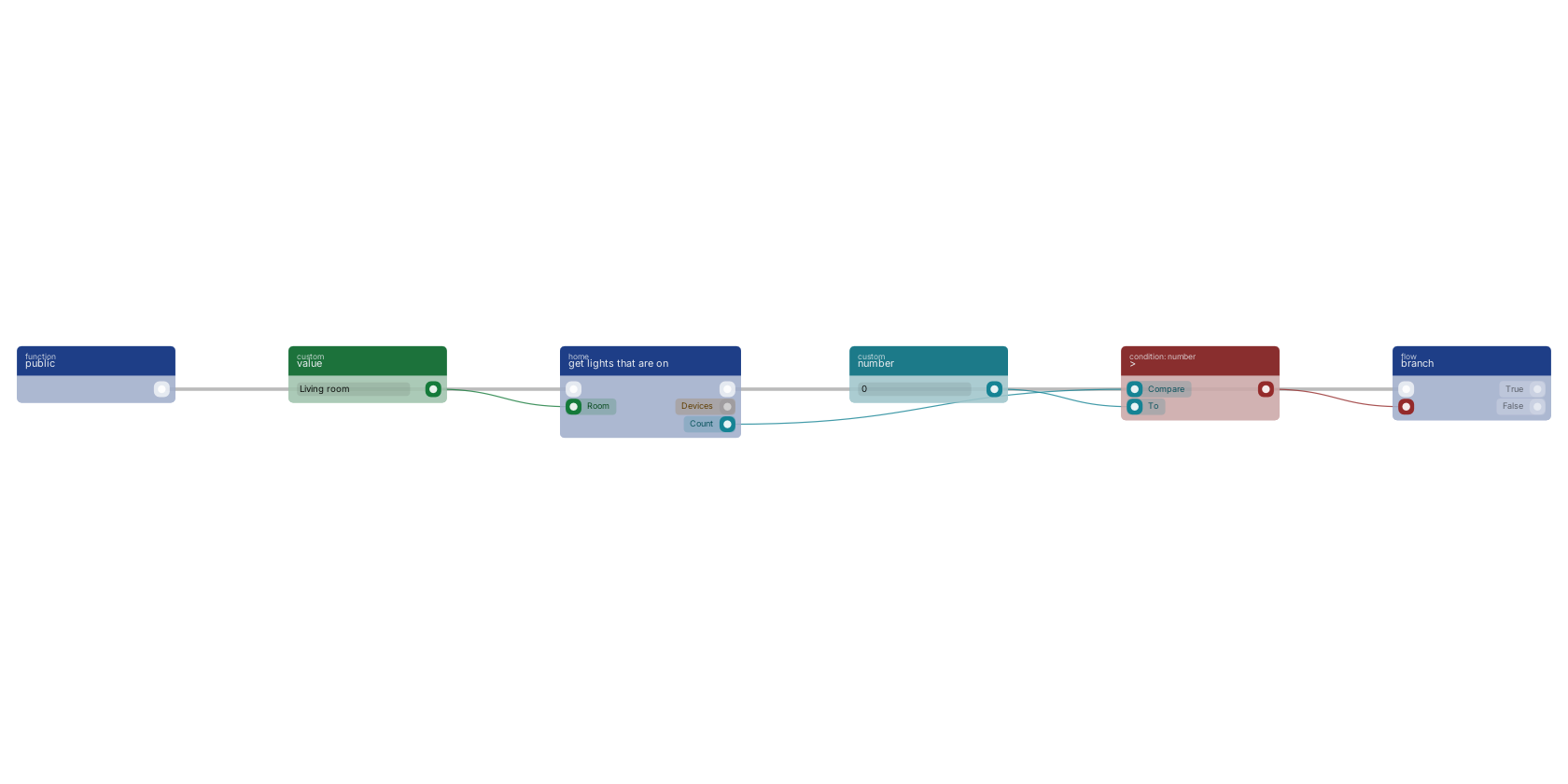
The query blocks read the in-memory device registry. No radio traffic, no network call, cheap enough to run inside a loop, which matters because the natural shape of "turn off every light" is a query feeding a map feeding a command.
| Block | Filters | Returns |
|---|---|---|
get all devices |
type, room, adapter, include unadopted |
devices, count. Adopted only unless you ask otherwise. Filters combine with AND. |
get active sensors |
sensor type, room |
Sensors currently reading true: motion present, doors open, leaks found. |
get lights that are on |
room |
Lights whose power state is known and true. |
get device |
device |
found, device, state (value per capability), available. |
get device state |
device, capability |
state known, value, plus boolean and number coercions for branching. |
get rooms |
The distinct non-empty room names across adopted devices, sorted. | |
get status |
adapters (name and connected), devices total, devices adopted, healthy. |
Unknown state is excluded, never assumed. A sensor the node has never heard from is left out of get active sensors rather than reported inactive, and a lamp whose power state nobody knows is left out of get lights that are on. get device state makes the same distinction explicit: when state known is false, value is empty and must not be read as false or zero.
Since last-known state is restored at boot, these lists are populated immediately after a restart rather than empty. What is not restored is reachability: a restored value does not set available, so get device reports available = false until the device actually reports. If a flow needs "this device is definitely there right now", read available rather than inferring it from the presence of a value.
get device reports found = false rather than erroring when nothing matches, so a flow can handle a missing device without an error branch.
get status is how you notice a bridge that has gone away, which otherwise looks exactly like a quiet house. Its healthy pin is true only when every configured adapter is connected, and a node with no adapters at all is not healthy: enabled with nothing wired is a misconfiguration, and reporting it green would hide exactly the case somebody is checking for.
get lights that are on reads the in-memory device registry, so it makes no network call and is cheap enough to run in a loop. It returns only lights whose power state is KNOWN and true: a lamp the node has not heard from since it started is left out rather than assumed off. The count pin feeds > and branch, which is the shape of "if anything is still on, do something about it".
Fleet Management
| Block | Pins | Does |
|---|---|---|
device adopt |
device, name, room |
Takes a discovered device into service. Reports newly, true only when this call is what adopted it. |
device rename |
device, name, room |
Sets the friendly name and/or room. Empty pins leave that field alone, so this can set a room without touching the name. |
device forget |
device |
Drops the device from RUAL. It stays paired to the radio and reappears, unadopted, on its next report. |
pairing open |
adapter, seconds |
Puts a radio into inclusion mode. Pass 0 to close pairing. |
Adopt happens before rename, not the other way round. Renaming a device that does not exist fails, and the flow this block is usually wired into (discovered, then adopt, then name it after the room) must not leave a half-onboarded device behind if the rename is what failed. If the adopt succeeds and the rename does not, ok stays true, newly is honest, and the error pin carries the rename failure. Adoption is the irreversible half and it worked.
The seconds pin on pairing open is a request. It is clamped to the node's pairing_window, and the clamp is not an error: the useful outcome, pairing being open, happened either way. A flow that failed because it asked for an hour would be worse than one that got two minutes.
Forget does not unpair. That is a separate, physically destructive operation, deliberately not exposed as a block. See Forget Is Not Unpair.
History
| Block | Pins | Returns |
|---|---|---|
get device history |
device, capability, from, to, buckets |
readings, buckets, count, recording, unit, error. |
The only block here that reads the analytics store rather than the live registry, which is why it is the only one that can answer a question about the past. The window defaults to the last 24 hours, and buckets greater than 0 additionally returns aggregated windows. Watch recording: false means this node stores no history for that capability, which is a different answer from "nothing happened".
The sampling policy, the bucket shapes and the energy dashboard are on Device History and Energy.
Next Steps
Example Flows These blocks wired into nine complete automations. Device History and Energy What gets stored, buckets versus raw, and the energy panel. Trigger Reference The blocks that start these flows.Frequently asked
How do I tell whether a RUAL device command actually worked?
Branch on the ok out-pin. A command to an unreachable bulb is an ordinary event in a house, so failures are reported on ok and error rather than thrown. Do not compare the returned device state: radio adapters return the pre-command snapshot because the device's own report arrives a moment later.
How do I set brightness and colour temperature on a RUAL light?
Use the brightness, kelvin and colour pins on the light on block, which sends every value set on it in one command so the lamp transitions once instead of stepping through full white first. Colour temperature is in kelvin, not mireds: 2700 is warm white and 6500 is daylight.
Are the RUAL device query blocks expensive to call?
No. Get all devices, get active sensors, get lights that are on, get device and get rooms read the in-memory registry, so they make no network call and touch no radio, and they are cheap enough to call inside a loop.