Building a Reporting API
Reports from storage data: aggregate with date histograms and terms, answer with a CSV or XLSX download, and deliver scheduled reports by email through the queue.
This tutorial builds a report endpoint: call it with a date range and get back a file, not a page of JSON. It covers the three shapes reports take in practice (a download now, an email later, a scheduled run), all fed by the same aggregation query. It assumes Storages and a registered endpoint; see Build Your First API for the latter.
1. The Aggregation
Reports group documents instead of listing them. The grouping block picks the dimension:
aggregation_type_date_histogram_bp_field(date histogram) buckets a date field perinterval(day,week,month): signups per day, revenue per week.aggregation_type_terms_bp_field(terms) counts documents per distinct value of a field: orders per status, tickets per assignee.aggregation_type_cardinality_bp_field(cardinality) counts distinct values, andaggregation_type_value_count_bp_field(value count) counts entries.
query_aggregation (aggregation) wraps the grouping block under a name and attaches it to the search. Feed it into the query pin of function_search together with a filter query that limits the range (see the query blocks in Storages). Wire several aggregations and the studio adds one extra query pin per aggregation on the search block, so one pass over the data can fill a whole dashboard.
2. The Download
For a file the caller saves directly, build it and reply with it in one flow:
A function trigger runs the report: a date histogram groups documents per day, aggregation names it and feeds search, and build CSV turns the result rows into a file that reply with file downloads to the caller.
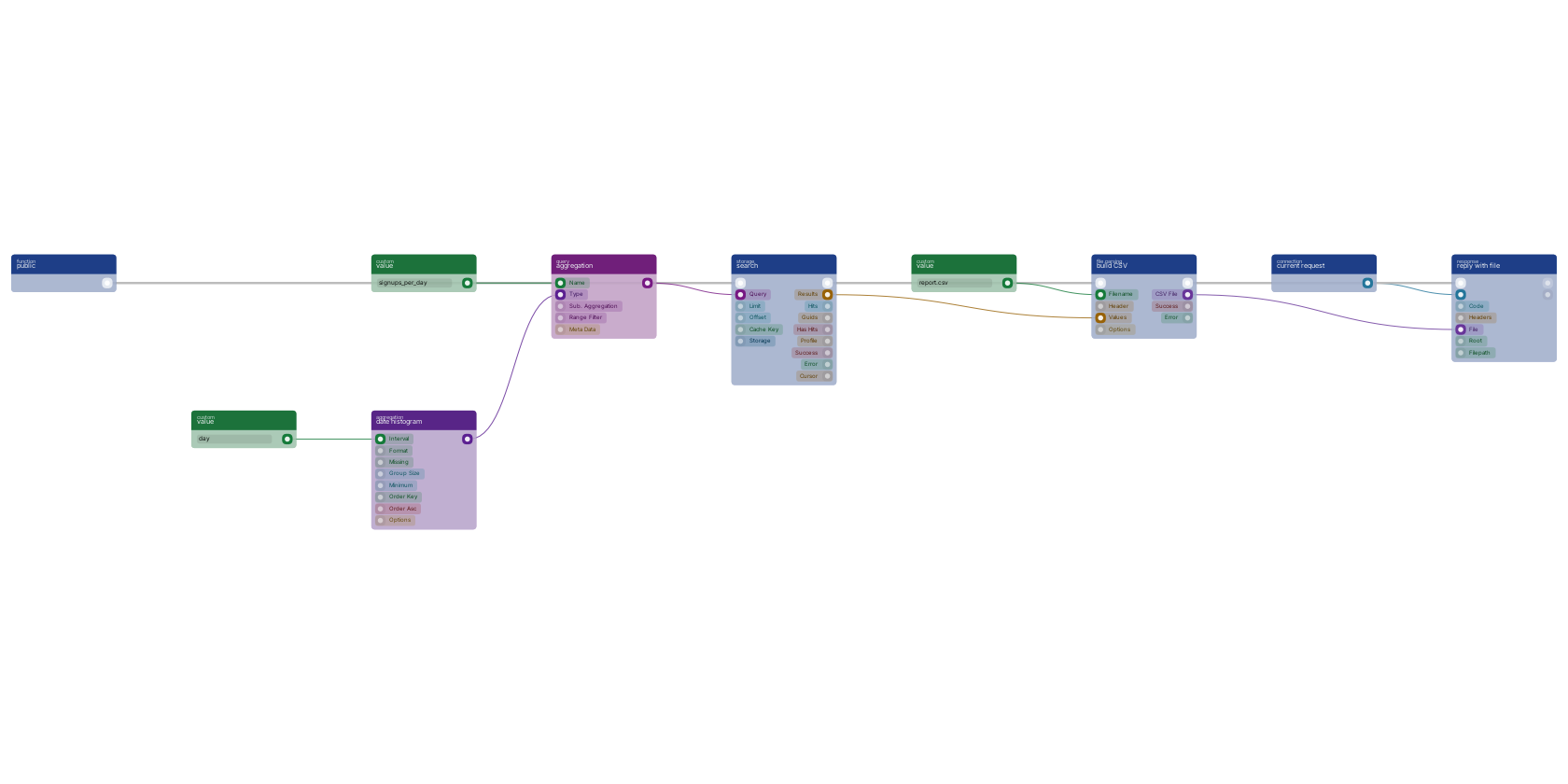
On the canvas: function_build_csv (build CSV) takes the search result rows as values plus a filename, and httpconnection_set_file (reply with file) streams the file to the caller through the httpconnection_current_request connection. For spreadsheets with real types and multiple sheets use file_to_xlsx (build XLS/X) instead; the wiring is identical.
3. Email and Scheduled Reports
A heavy report does not belong inside the request that asked for it. The pattern that scales:
- The endpoint validates the request and hands the work to
function_custom_execute_from_queue(execute in queue), then replies immediately with 202. See Queue. - The queued function runs the same aggregation, builds the file, and mails it as an attachment with
postmarkconnection_send_email_template(send email with template), which takes the CSV or XLSX straight on itsfilepin. See Email System Setup for the connection. - A report that runs on its own schedule (the Monday morning export) starts from
schedule_repeating_event(repeating event) instead of an endpoint. See Repeating Events.
Notes From Practice
- Reports over large storages are read-heavy by definition; give the search a
cache_keyso a dashboard refreshed by ten people runs the aggregation once. See Caching Strategies. - Branch on the search block's
successpin and reply with an error body on failure, per Error Handling. A report that silently returns an empty file is worse than none. - Scope report endpoints tightly: they aggregate exactly the data most callers should not bulk-download.
*loggedinat minimum, a custom scope for anything financial. See Remote Access Control. - Date histograms group on the stored date field;
_meta.createdis the one every document already has.
Frequently asked
How do I build a CSV report from storage data in RUAL?
Group the documents with an aggregation block such as aggregation_type_date_histogram_bp_field, attach it to a search with query_aggregation, feed the result rows to function_build_csv, and reply with the file through httpconnection_set_file.
How do I email a report on a schedule in RUAL?
Start the flow from schedule_repeating_event instead of an endpoint, run the same aggregation, and mail the built file with postmarkconnection_send_email_template, which accepts the CSV or XLSX directly on its file pin. Reports triggered by a request go through the queue so the API can reply immediately.