search
This block is part of the storage group and was last modified in core v13.0.4.
Storage Selection Required
This block relies on a storage to perform its storage releated actions. You must manually select the storage you want to use in your flow using the storage selector modal. To access the modal, click the white button on the block.
search v13.0.4 searches in the given storage based on a query.
- flow
flow - Query required
querychoose the query you would like to run, keep them simple for speed. • Suggestions:
query_bool_mustquery_bool_must_notquery_bool_should - Limit
number - Offset
number - Cache Key
v13.0.4valueYou can use this option to serve cached results for frequently used and resource-intensive searches. If the data doesn't change, repeated searches with the same cache key retrieve results from the same request cache. For time series use cases, such as logging, data in older data is rarely updated and can be served directly from this cache.
- Storage
storage
- flow
flow - Results
arrayArray of objects, each object is a single document. All results always include
_meta. - hits
numberNumber of documents found matching the given query.
- guids
v10.6.2array - Has hits
condition - Profile
arrayAnalyzed profile of the query, this data is gathered only when the query includes the
Profileaction. - success
condition - error
value - cursor
arraySort values of the last hit. Pass this to a search_after query block for cursor-based pagination.
Runs the merged query (all wired query* pins deep-merged, bool clauses concatenated) against the storage and outputs the matching documents on array, their GUIDs on guids, and has_hits=true when anything matched. hits is the RETURNED array length by default, not the total match count; the total is only reported when the query opts in via include_hits or profile. Default limit is 5000 when unwired. When the query returns aggregations, array holds a single object with the aggregation results instead of documents. Missing storage gives success=false with error MISSING_STORAGE; a failed search gives success=false, the error message, an empty array and hits=0.
database |
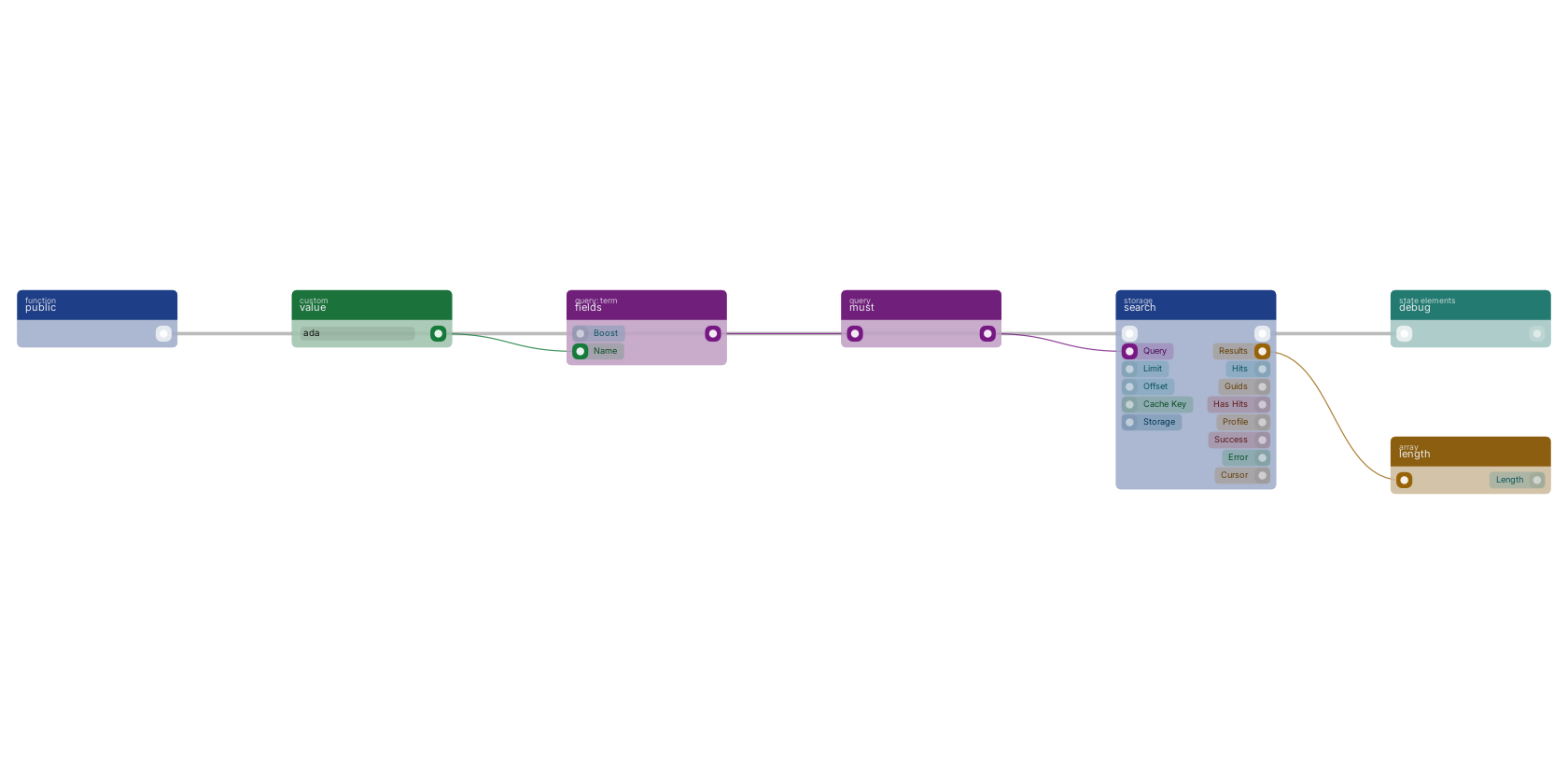
A function trigger starts the flow, a term query built with fields and must feeds the query pin, and search returns the matching documents. The results array is counted with length here; in API blueprints it typically goes straight to the reply.
Commonly used with
One of the most-used blocks across production blueprints. It is most often wired together with:
- branch: wired in both directions with this block.
- must: feeds into this block. All queries provided must match.
- reply in JSON: this block feeds into it. Reply to any httpconnection as JSON body.
- create: feeds into this block. Creates a new function that can be executed using the given name.
- filter: feeds into this block. Build a custom query using higher-level bool query.
- multiple: feeds into this block.
Used in these guides
These documentation pages use or explain this block:
- Building a Reporting API
- Common Blueprint Patterns
- Places and Geo Search
- Storages
- Build Your First CRUD App
- Block Quick Reference
- Blueprint Language Syntax
Version history
Introduced in v13.0.4.
v10.6.2, click here to see the release notes. Back to
storage Return to the main group to view all sub-groups Back to storage Return to the group to view all blocks within this group