Example Flows
Nine complete automations, block by block: which trigger, how the chain is wired and why. In all of them the trigger does the filtering: its device and room pins narrow the flow, not an if in the chain.
Every flow is built from the Trigger Reference and Action Reference blocks, plus ordinary RUAL blocks. Device references are written as an exact device name (Hallway ceiling); a platform id such as zigbee:0x00158d0007e1a2b3 works identically.
1. Motion lights, but only after dark
What it does. Somebody walks into the hallway. If the hallway is actually dark, the light comes on, warm and dimmed. If it is the middle of the afternoon, nothing happens.
| Block | Wired |
|---|---|
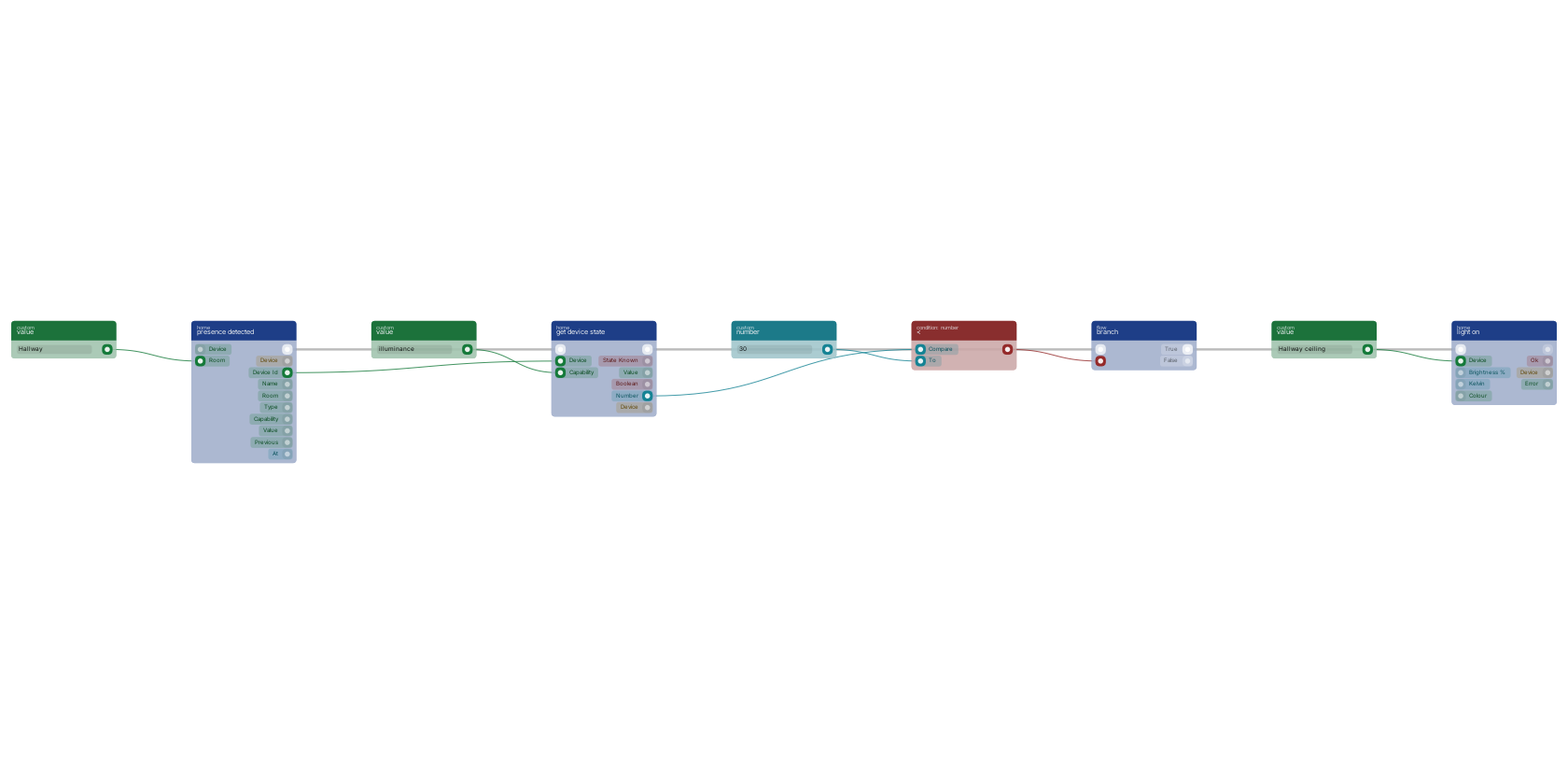
presence detected | room Hallway, device pin empty |
get device state | device from the trigger's device id, capability illuminance |
< | the state block's number pin against 30 |
branch | flow from the state block, condition from the comparison |
light on | on the branch's true pin, device Hallway ceiling, brightness 40, kelvin 2700 |
- Device pin empty, room pin set. One block covers every motion sensor in the hallway. Add a second sensor later and it works with no edit.
- The lux reading comes from the sensor that fired, by feeding the trigger's
device idintoget device state. Most motion sensors report lux as well as occupancy. Hard-code another sensor's id when the motion sensor has no light meter. - Brightness and kelvin ride along on
light on. One command means the lamp transitions once instead of visibly jumping to full white first. - It fires on the transition, so somebody standing still does not re-run this every thirty seconds and fight anyone who dimmed the lamp by hand.
- Turning it off is a separate flow:
presence cleared, roomHallway, intolight off. The delay before it fires is the sensor's own stillness timeout, usually 60 to 120 seconds. If you want longer, put adelayblock in front of thelight off.
The most common automation there is. presence detected fires on the false to true transition of occupancy in the hallway, so somebody standing still does not re-run it. Its device id feeds get device state, which reads the illuminance the same sensor reports; < compares that against 30 lux and branch only lets light on run when the room is actually dark.
2. A door opens while nobody is home
What it does. The front door opens. If no motion sensor anywhere in the house currently reads occupied, that is worth a notification.
| Block | Wired |
|---|---|
contact opened | device Front door |
get active sensors | sensor type occupancy, room empty |
== | the query's count against 0 |
branch | true pin into the notification of your choice |
- "Nobody home" is derived, not tracked.
get active sensorsreads the in-memory registry, so asking costs nothing, and asking at the moment the door opened is more accurate than a flag some other flow maintains. - Use the trigger's
nameandatpins in the message. "Front door opened at 14:32" is a useful notification; "a contact sensor changed" is not. - A sensor the node has not heard from is excluded rather than counted as inactive. A device that has never reported since it was adopted is invisible to this flow.
- Occupancy decays. A sensor that read occupied when the node went down is restored as occupied, and stays that way until it reports again.
- Occupancy is not presence. A motion sensor reads false when a person sits still. A phone or a presence-detection radar such as an FP2 (which reports
occupancycontinuously rather than on motion) is the better input if false positives are unacceptable.
3. A leak shuts the valve and raises an alarm
What it does. A leak sensor finds water. A smart valve closes, and somebody is told.
| Block | Wired |
|---|---|
water leak detected | device and room both empty: any leak sensor anywhere |
switch off | device Water valve |
branch | condition from the switch block's ok pin |
| notification | on both branches, with different text |
- The device pin is empty on purpose. Enumerating sensors means the one you install next year is not covered.
- The valve comes before the notification. It limits the damage, and should not wait on an email API.
- The branch on
okis the important part. "Leak detected in the basement, valve closed" and "Leak detected in the basement, VALVE DID NOT RESPOND" call for different human behaviour. - Repeated firing is not a problem. A sensor sitting in a puddle and re-reporting does not send thirty notifications. It fires again only if the sensor dries out and gets wet again.
4. A double press sets a scene
What it does. One button, three behaviours: single press toggles the lamp, double press sets a warm evening scene across several lamps, hold turns everything off.
| Block | Wired |
|---|---|
button pressed | device Living room button |
switch | expression from the trigger's value pin |
light toggle | on the single case |
three light on blocks | on the double case, each with its own brightness and kelvin |
light off blocks | on the hold case |
- A scene is a few blocks in a row, not a stored object. So it can read the time, check who is home, or vary by season.
- Find out what your button sends before you write the cases. Aqara buttons send
single,doubleandhold; a Hue dimmer sendsinitial_press,short_releaseandlong_release; a four-button remote prefixes each with the button number. Press it once with the Zigbee2MQTT frontend open, or readget deviceand look atstate.action. - Every press fires, so pressing the same button twice runs the flow twice.
5. A temperature crossing runs the air conditioning
What it does. The office passes 25 °C during the day, so the air conditioner starts cooling to 22 on a quiet fan. When it drops back below 22, the unit goes off.
| Block | Wired |
|---|---|
temperature changed | room Office, above 25 |
climate set | device Office AC, mode cool, target 22, fan silent |
| and a second, separate flow: | |
temperature changed | room Office, below 22 |
climate set | device Office AC, mode off |
- It depends on crossing semantics. A thermometer reporting every minute produces hundreds of readings above 25. Because
abovefires on the crossing, the unit is told once. - The two thresholds are different numbers. Cooling starts at 25 and stops at 22, so the unit does not switch on and off every time the reading wobbles across one value. Picking that gap (hysteresis) is yours to do.
- Mode, target and fan go in one
climate set. A Daikin local API rejects partial updates and resets anything you leave out, so the adapter reads the whole control block, applies your changes and writes it back as one operation. Three blocks would be three cycles, and an occupant can hear the unit stepping through them. - A mode other than
offimplies switching the unit on, so there is no separate power step. - The Daikin adapter polls. With the default 30 second interval, the temperature RUAL reacts to can be up to 30 seconds old. A Zigbee or Z-Wave thermostat pushes and has no such delay.
6. Energy over a threshold raises a warning
What it does. A metering plug reports power draw. When something on that circuit pulls more than 2400 W for more than a minute, warn.
| Block | Wired |
|---|---|
device state changed | device Utility plug |
== | the trigger's capability pin against power_watts |
> | the trigger's value pin against 2400 |
AND | both conditions |
branch, delay, get device state, >, branch | wait 60 seconds, re-read power_watts, and only warn if it is still high |
- There is no
power changedtrigger. Only temperature and humidity have dedicated threshold triggers, so anything else numeric goes throughdevice state changedwith a check on thecapabilitypin. The device pin narrows it to that one plug. - The delay-then-recheck is the point. A kettle pulls 2400 W for ninety seconds every morning. You want a load that is still drawing when you look again, and the registry already knows the current value, so re-asking is free.
- Watch the concurrency budget. At most 16 device flows run at once, and a
delayholds one of those slots for its whole duration. One minute is fine. If you want ten, move the waiting into the queue or a repeating event. - For totals rather than spikes, do not accumulate in a flow. The node can hand you consumption per hour or per day: see Device History and Energy.
7. The house empties, every light goes off
What it does. The last occupancy sensor clears. Every light that is currently on is switched off, without naming any of them.
| Block | Wired |
|---|---|
presence cleared | device and room empty |
get active sensors | sensor type occupancy |
== and branch | count against 0: nobody anywhere |
get lights that are on | room empty |
select field values | the devices array, field id |
map | that array of ids |
execute and light off | the map's function pin drives the execute block, whose value pin is one device id, into the light off device pin |
- The result is derived from live state, not from a list of light names you maintain. Install a lamp next year and it is covered.
select field valuessits between the query and the map because the query returns device objects andlight offwants a device reference.- Only lights that are actually on are touched. Lamps whose state the node does not know are excluded rather than assumed off.
- The re-check matters.
presence clearedwith an empty device pin fires when any sensor clears. Askingget active sensorswhether anything is still occupied turns "a sensor cleared" into "the house is empty". - For a per-room version, set the room pin on both the trigger and the query, and drop the whole-house check.
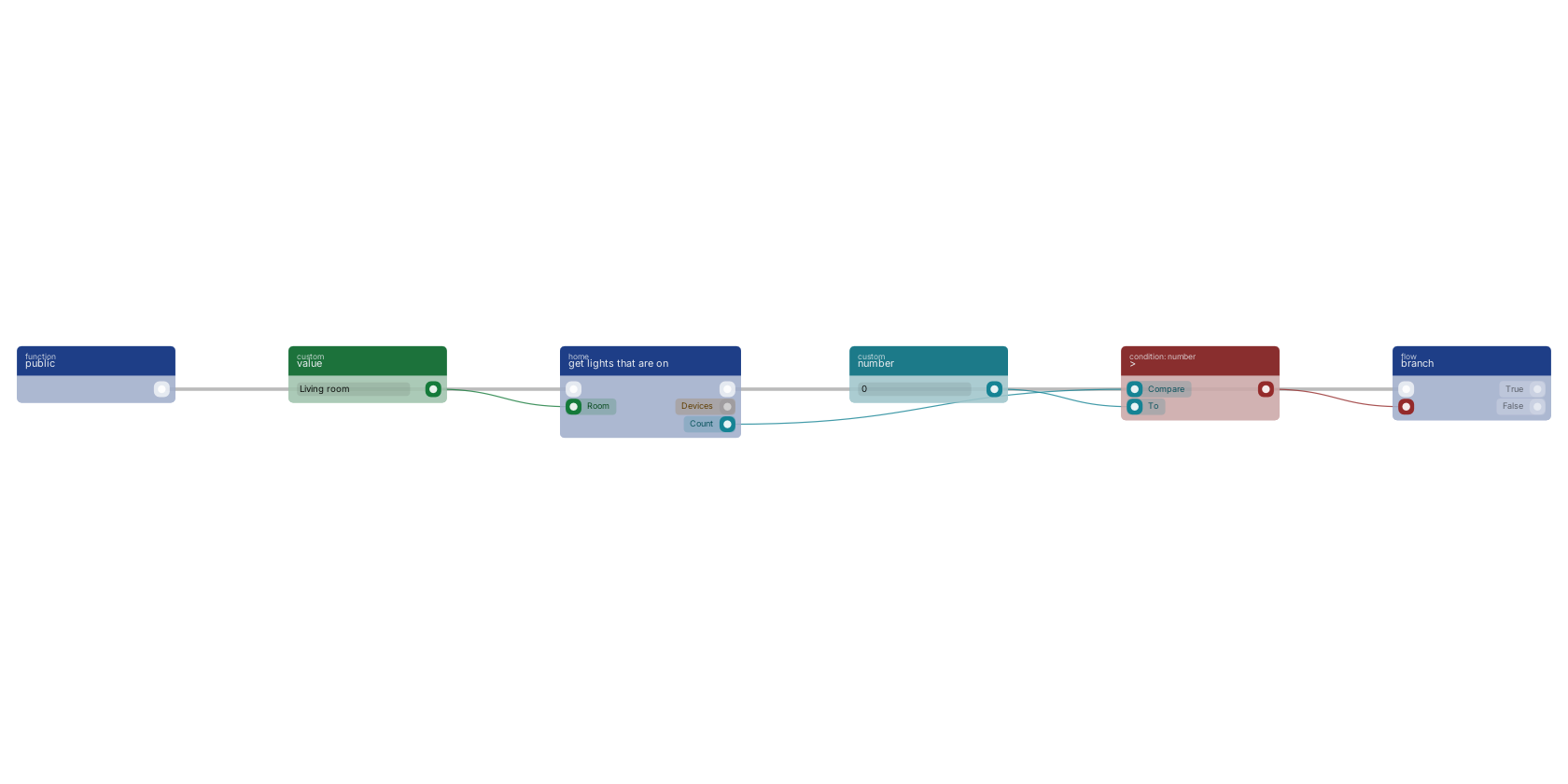
get lights that are on reads the in-memory device registry, so it makes no network call and is cheap enough to run in a loop. It returns only lights whose power state is KNOWN and true: a lamp the node has not heard from since it started is left out rather than assumed off. The count pin feeds > and branch, which is the shape of "if anything is still on, do something about it".
8. Auto-adopting a new device into a room
What it does. While you are commissioning a floor, every device that pairs is adopted, named after its model and placed in the room you are working in, without a trip to the API for each one.
| Block | Wired |
|---|---|
device discovered | device and room empty |
get value variable | a variable holding the room you are commissioning, for example commissioning_room |
device adopt | device from the trigger's device id, room from that variable, name from the trigger's name pin |
branch | on the adopt block's newly pin, into a notification or a log document |
device discoveredis the only trigger that fires for unadopted devices. It fires once per device, the first time it is ever seen.device adopttakes name and room pins, so onboarding is one block. If the rename half fails the adoption still stands:okstays true, and the error pin carries the rename failure.- Branch on
newly, not onok. Adoption is idempotent, so notifying onokwould announce devices that were already yours. - Prefer this to
auto_adopt = true. The config flag adopts everything the radio can hear, forever. This flow is a switch: keep it deactivated, activate it while you are physically commissioning, and deactivate it when you are done. No restart is needed. - A safer variant: wire
device discoveredinto a notification carryingnameanddevice id, and adopt from the studio when you recognise it. That is the right default for a mesh that is not brand new.
9. An unknown card at three in the morning
What it does. Somebody is refused at the front door. During the day that is a colleague with an expired badge and not worth a message; at night it is worth waking up for. Meanwhile every successful entry is logged with who and how.
| Block | Wired |
|---|---|
access denied | device empty: any door |
date now, branch | outside working hours |
| notification | with the trigger's name, actor and method pins |
| and a second flow, for the log: | |
access granted | device empty |
create document | a storage document carrying actor, method, name and at |
- The
actor,methodandgrantedpins are on the trigger itself. "Access denied at Front door, unknown card, nfc" is actionable; "a door reported something" is not. - Denied and swiped are different triggers.
access deniedfires on the decision. To react to a specific card regardless of the decision, useNFC card swipedwith itscardpin. - Write the log with a flow, not with history. Access events are recorded in device history, but "who came in last month" is a table you will want to query, filter and export. A storage document per entry gives you that.
Patterns worth reusing
| When you want | Reach for |
|---|---|
| One flow covering a whole room or the whole house | Leave the trigger's device pin empty, set the room pin |
| A condition about the world right now | A query block: they read memory and cost nothing |
| To know whether a command actually landed | Branch on ok, not on the returned device state |
| To act on a device the trigger identified | Feed the trigger's device id into the next block's device pin |
| To act on many devices at once | Query, select field values for id, map, command |
| A numeric capability with no dedicated trigger | device state changed narrowed to one device, then check the capability pin |
| To avoid reacting to a momentary spike | delay, then re-read with get device state |
| To answer a question about the past | get device history, not a variable you maintain |
Next steps
Device History and Energy Questions about the past: what is recorded, and how to read it back. Troubleshooting When one of these does not fire, this is the checklist. Common Blueprint Patterns The general-purpose shapes these flows are built from.Frequently asked
How do I turn on a light only when it is dark in RUAL?
Wire presence detected into get device state reading the illuminance capability of the same sensor, compare that number against a lux threshold, and put a branch in front of light on. Most motion sensors report lux as well as occupancy, and the reading from the sensor that fired describes the space it is watching.
How do I turn off every light in RUAL without naming them?
Feed get lights that are on into select field values for the id field, then into map, and drive light off from the execute block inside the map. The query returns only lights whose power state is known and true, so lamps the node has not heard from are left alone rather than blasted with commands.
How do I automatically adopt new smart home devices in RUAL?
Wire the device discovered trigger into the device adopt block, which takes optional name and room pins so onboarding is a single block. Keep that flow deactivated and activate it only while you are physically commissioning hardware, which is safer than the auto_adopt config flag because that adopts everything the radio can hear, forever.