Common Blueprint Patterns
Copyable blueprint recipes for everyday tasks: form validation, API auth, the JSON response backbone, data transformation, error handling, and caching with Redis and storage events.
Each pattern below is a mini-recipe you can copy straight onto your canvas: the goal, when to use it, the blocks involved with their wiring, and notes from practice. Every block mentioned exists in the current block library. Search its type name in the blueprint editor to add it.
1. Form Validation
Goal: Reject incomplete submissions before they reach storage.
When to use: Any state page that accepts user input through a form and writes it to storage or passes it to a function.
Recipe:
| Block | Purpose | Connects To |
|---|---|---|
state_form (form) |
Renders the form and collects user input into the state. | Submit button triggers state_form_get |
state_form_get (get form data) |
Retrieves the submitted form data from the state. Exposes a form-object out-pin with the field values and a form-error value pin for form-level errors. |
Condition blocks, one per required field |
condition_not_empty_value (is not empty) |
Returns true when the field value from form-object is filled. |
A condition branch guarding the save flow |
function_console_log (log) |
Optional: writes validation failures to the blueprint console while developing. | The failing branch of the condition |
Wire every required field of the form-object into its own condition_not_empty_value block. Only when all conditions pass does the flow continue to the create or update document blocks; otherwise it branches to an error message in the UI.

Notes:
- Validate before touching storage. A rejected submission should never produce a document.
- Keep one condition block per field instead of one combined check, so the UI can tell the user exactly which field failed.
- Inspect the
form-errorpin first: form-level errors mean the submitted data could not be read at all.
2. API Authentication
Goal: Expose an API endpoint only to the right callers, with explicit error replies for everyone else.
When to use: Any custom API built with an on_startup_register_uri_{method} block that should not be fully public.
Recipe:
| Block | Purpose |
|---|---|
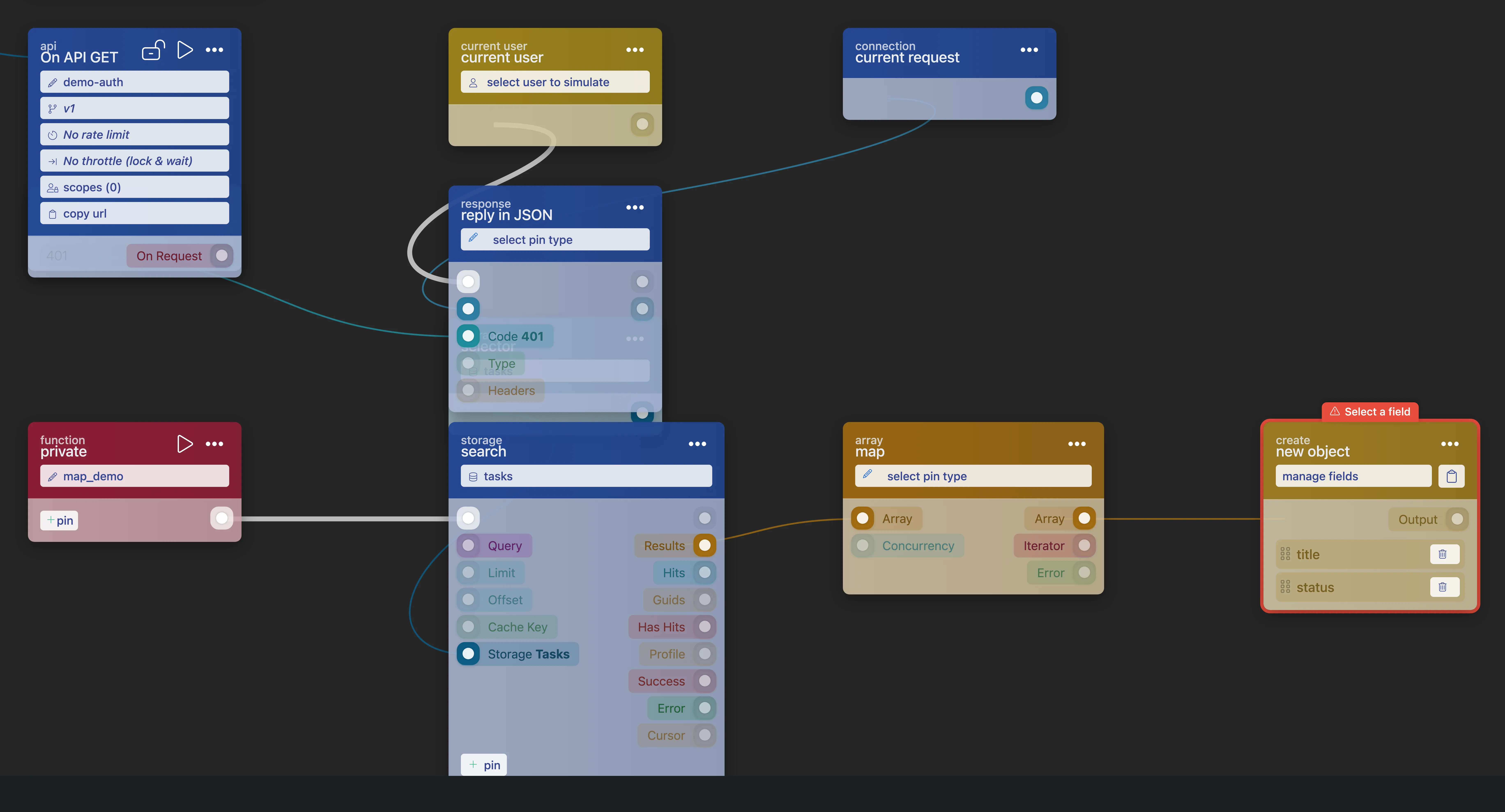
on_startup_register_uri_get (on api get) |
Exposes a GET URI on /api/. Set its scopes through the lock icon: *public (default, everyone), *loggedin (authenticated users only), or a custom scope. |
user_current (current user) |
Returns the logged-in user object, so the flow can identify who is calling. |
httpconnection_current_request (current request) |
Retrieves a reference to the current HTTP connection, needed to send an explicit reply. |
httpconnection_set_json (reply in json) |
Replies to the connection with a JSON body and a status code in-pin. Use 401 for unauthenticated and 403 for unauthorized callers. |
With the *loggedin scope, the cluster rejects requests without a valid access_token before your flow runs. Inside the flow, user_current plus a condition on the user's scopes lets you add finer-grained checks and answer failures yourself through httpconnection_set_json.
Notes:
- Callers can pass the token five ways:
Authorization: Bearerheader,x-authtokenorx-tokenheader, anaccess_tokencookie, or the?access_token=query parameter. See Adding tokens to your requests. Tokens are valid for 14 days and extend automatically while actively used (Token Expiry). - Protect the endpoint further with a rate limit or throttle in a few clicks.
- An endpoint that still returns 404 after scoping usually was never activated. Press
Activateand deploy for production traffic. See API not activating.
3. The JSON API Response Backbone
Goal: Answer an API call with a clean, shaped JSON body.
When to use: Every custom endpoint handler. This chain is the most common wiring in production blueprints by a wide margin: across the production blueprints on our own cluster, httpconnection_set_json is fed by httpconnection_current_request more than any other pair (541 wires), and object_field_getter_multiple is the most-used non-input block of all (571 instances across 79 blueprints).
Recipe:
| Block | Role in the chain |
|---|---|
on_startup_register_uri_get (on api get) |
Registers the endpoint; its function pin roots the handler function. |
httpconnection_current_request (current request) |
The connection reference: feeds the input readers and the reply block. |
httpconnection_get_body (get body) / httpconnection_get_params (get params) |
Reads the request input: the body object on writes, the URL parameters on reads. |
object_field_getter_multiple (get fields) |
Outputs one pin per selected field of the request or document object, so every following block wires a named field instead of digging into an object. |
object_new_fields (new object) |
Builds the response object with only the fields the caller may see. |
httpconnection_set_json (reply in json) + number_default (number) |
Sends the object with an explicit status code: 200 on the happy path, 4xx on the guarded paths. |
Notes:
- Reply on every path, including validation failures and not-found branches. A caller left without a reply sees a timeout, not an error.
- Shape the response with
object_new_fieldseven when the document already looks right: it keeps_metainternals and future private fields from leaking into the API. - Reading input fields with
object_field_getter_multipleinstead of ad-hoc object access keeps the handler readable when the payload grows.
4. Data Transformation
Goal: Turn storage documents into exactly the shape your API or UI needs: no more, no less.
When to use: Shaping API responses, converting arrays of documents, and writing denormalized data.
Recipe A: shape a response object: Feed the fields you want to expose into an object_new_fields (new object) block, which builds a fresh object containing only those fields. Use object_update_fields when you want to adjust an existing object instead of building a new one. This keeps internal fields such as _meta internals out of your API responses.
{
  "guid": "a23575f49d0af385314c1f02280163374297e018a692e5e4ab85eb307ebf6ebc",
  "username": "joe",
  "email": "joe@example.com"
}
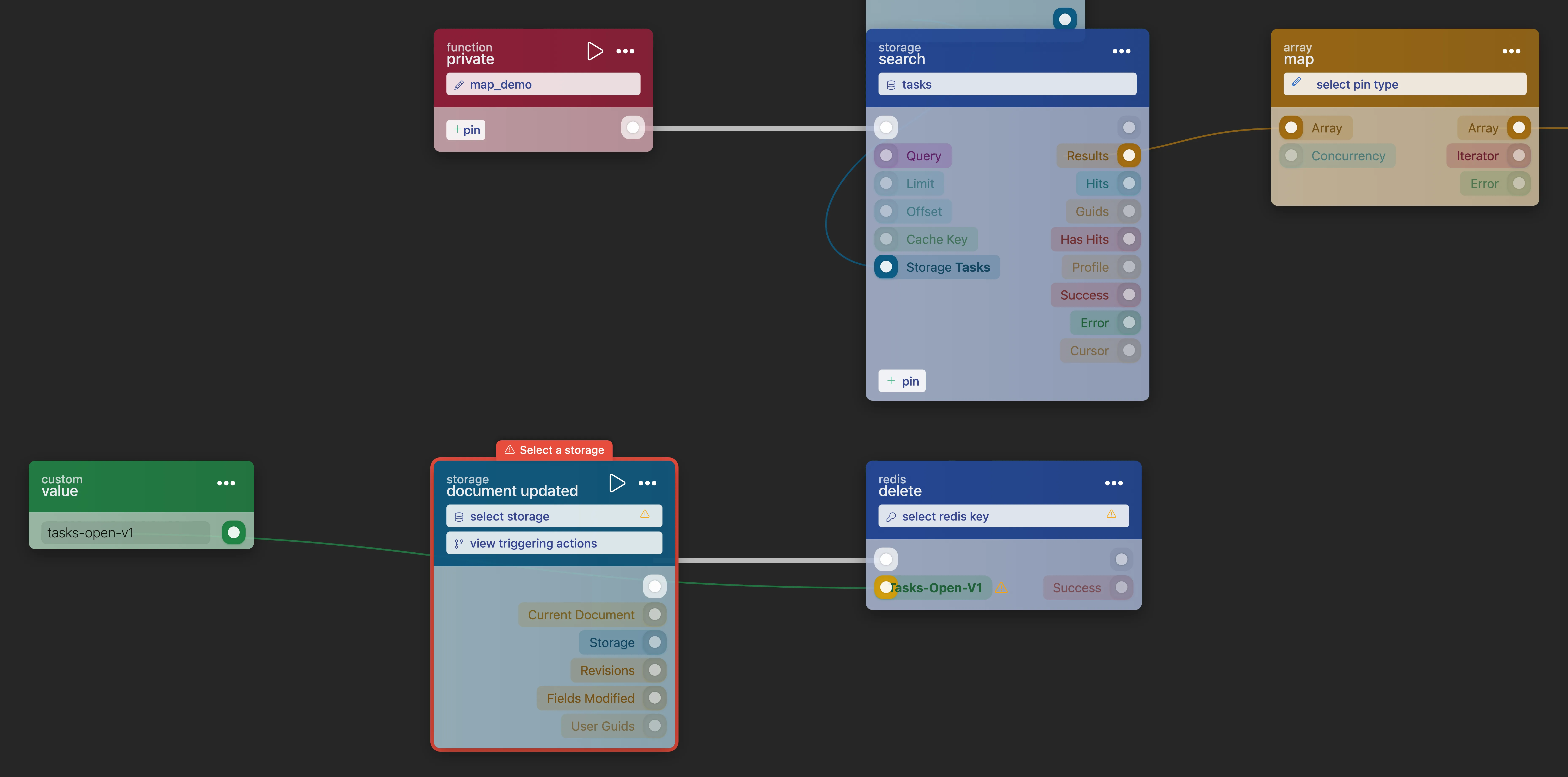
Recipe B: transform an array: Connect the array to an array_map (map) block. It applies the connected function to every element and returns a new array with the results: the way to run per-element logic (formatting, lookups, parsing) over a function_search result. It accepts a concurrency number in-pin and exposes an error value out-pin; array_map_parse (map and parse) is the variant for parsing each element along the way. For simply picking fields off each document, the getter-plus-object shape from the response backbone above is what production blueprints use most; reach for map when each element needs its own flow.
Recipe C: denormalized writes: Because RUAL storage has no relationships, include all data you need inside each document. Build the fields with mutations_set_bp_field_multiple and write them with function_create_document_from_mutations (create document) or function_update_document_mutations (update document). When a source document changes, keep the embedded copies in sync with a storage_event flow. See Data Modelling Without Relations.
5. Error Handling
Goal: Make failures visible, answer them properly, and retry work that deserves a second attempt.
When to use: Every flow that touches storage, HTTP requests, or any other operation that can fail. RUAL has no try/catch. Blocks that can fail expose a success condition pin and an error value pin, and the flow keeps running unless you branch on them.
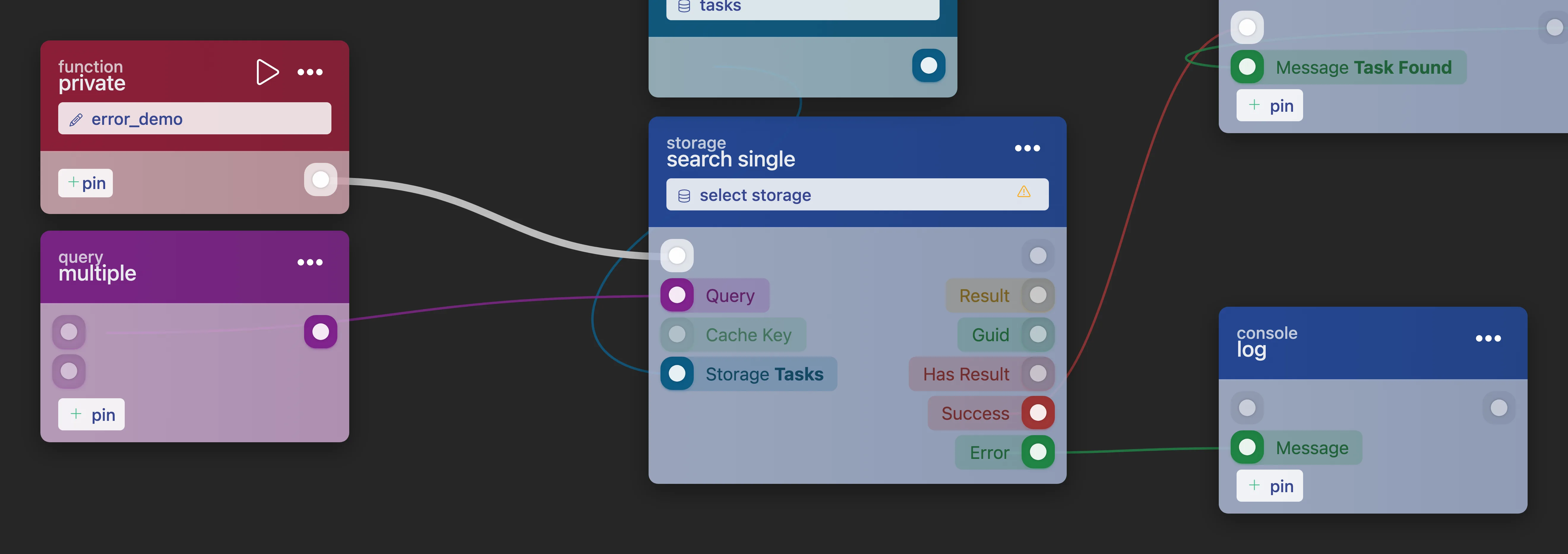
Recipe: log and reply (error_demo style):
| Step | Wiring |
|---|---|
| 1. Branch on the result | Connect the block's success pin to a condition block: true continues the happy path, false enters the error path. |
| 2. Log the failure | Connect the error pin to the message in-pin of function_console_log (log), so the failure appears in the blueprint console. |
| 3. Reply with an error | Reply through httpconnection_set_json with a 4xx/5xx code for APIs, or show an error message in the UI for pages. |
A typical error payload looks like this:
{
  "success": false,
  "error": "Document not found for the given GUID"
}
Notes:
- Retry via the queue: for background work that may fail transiently, (re)schedule it with
function_custom_execute_from_queue(execute in queue). It runs the function at a given time without waiting, and accepts an optionalunique_idanddebounceto avoid duplicate runs. See Queue. - Audit failures yourself: the blueprint audit log records modifications, not runtime errors. For a failure trail, write errors to a dedicated storage with
function_create_document_from_mutationsor send them to an external webhook. The patterns from Error Handling. - An unconnected
errorpin means failures pass silently. Always wire it somewhere. See Reading error messages.
6. Caching Strategies
Goal: Stop paying for the same query twice.
When to use: Read-heavy flows and high-traffic pages. A single search is cheap, but 300 simultaneous page visits run it 300 times a minute.
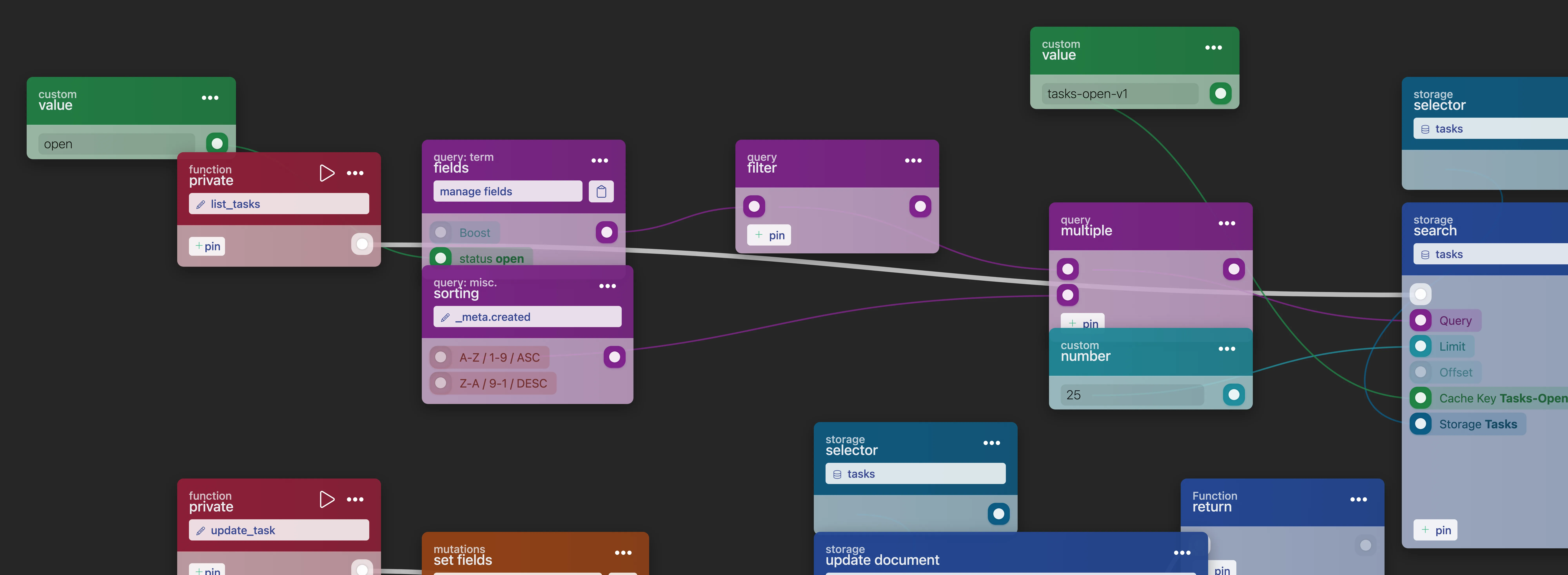
Recipe A: built-in search cache: function_search has a Cache Key value in-pin. Pass a key that identifies the query (for example the searched user GUID) and repeated identical searches are served from cache instead of hitting storage again.
Recipe B, manual Redis check-aside:
| Block | Role in the pattern |
|---|---|
value_redis_cache_get_key (get cache) |
Reads the cached value for a key before you query storage. |
function_redis_cache_get_exists (get cache key) |
Flow-based variant: returns an exists condition plus the value, ideal for the cache-hit / cache-miss branch. |
function_redis_cache_set_key_json (set json) / function_redis_cache_set_key (set) |
On a cache miss, run the search and store the result (JSON or string) under the key. Both accept an optional ttl in seconds. |
function_redis_cache_ttl (set cache ttl) |
Adjusts the time-to-live of an existing key. |
Recipe C: invalidate on write: cached data must die when the underlying documents change. Add a storage_event (trigger event) flow on the storage. It fires on created, updated, removed, and saved events: and remove the affected keys with function_redis_cache_delete_key (delete), or overwrite them with fresh data right away.
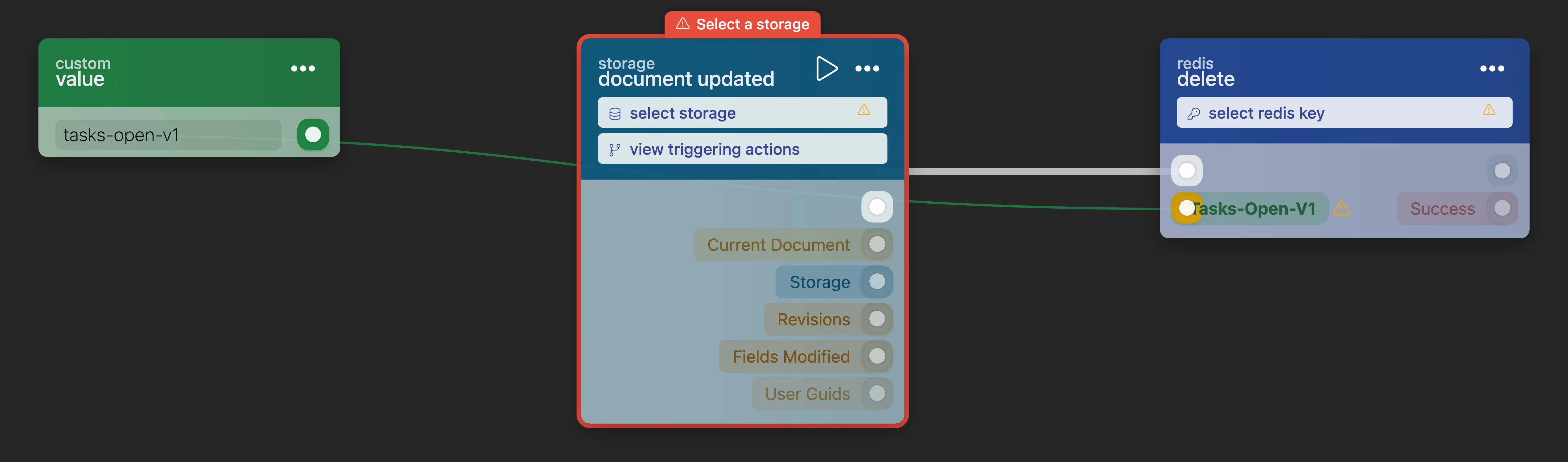
Recipe D: compute a static lookup once per run: a data block read by several blocks is computed once per run, so wire one lookup (a fixed list, a parsed JSON constant) to all of its readers instead of copying an expensive one. Block outputs are not kept between runs, even though the blueprint itself is precompiled: for data that is expensive to build and rarely changes, cache it in Redis with the recipes above.
Notes:
- Never cache what must be real-time. If a screen must show the absolute latest data, prefer the
disable cachequery option over cached results: and read the trade-off in Common Pitfalls. - Invalidate narrowly: delete or overwrite the keys affected by the write instead of flushing broad key ranges.
- Background on cache strategy lives in Caching with Redis and Common Pitfalls.
Frequently asked
How do I validate a form before saving it in RUAL?
Read the submitted data with state_form_get and wire every required field of the form-object into its own condition_not_empty_value block. Only when all conditions pass does the flow continue to the create or update blocks, so a rejected submission never produces a document.
How do I reply with JSON from a RUAL API endpoint?
The standard chain is on_startup_register_uri_get into httpconnection_current_request, reading input with httpconnection_get_body or httpconnection_get_params, shaping the response with object_new_fields, and sending it with httpconnection_set_json plus an explicit status code. Reply on every path, including failures, or the caller sees a timeout instead of an error.
How do I cache a search result in RUAL?
Pass a Cache Key that identifies the exact query to function_search, or use the Redis blocks directly: check the key with function_redis_cache_get_exists, store the result with function_redis_cache_set_key_json and a ttl, and delete the key from a storage_event flow when the underlying documents change.
How do I handle errors in a RUAL flow?
RUAL has no try/catch: blocks that can fail expose a success condition pin and an error value pin, and the flow keeps running unless you branch on them. Connect success to a condition, log the error pin to function_console_log, and reply with a 4xx or 5xx code on the guarded paths.