
create payment
This block is part of the stripe group and was last modified in core v15.0.0.
create payment v15.0.0 Creates a PaymentIntent : the route for a custom card form, where the page confirms with Stripe.js using the client secret. For a hosted payment page use create checkout instead. Also the way to charge a card already on file, with off session.
- flow
- connection
stripeconnectionrequired - amount
numberrequiredAmount in the smallest currency unit : €10.00 is
1000. - currency
valueThree-letter ISO code, lowercase. Default
eur. - description
valueShows in the Stripe dashboard and on some statements.
- customer id
value - payment method id
valuepm_… : a saved card to charge. Required with
off session. - off session
booleanCharge a saved card with the customer not present : a renewal, a top-up. Confirms immediately and tells the bank nobody is there to answer a 3D Secure challenge.
- confirm now
booleanAttempt the charge as part of this call rather than leaving it for the browser.
- save card
booleanKeep the payment method on the customer for future off-session charges.
- payment methods
array<value>Restrict the methods offered, e.g.
["ideal","card"]. - receipt email
valueStripe emails its own receipt here once the payment succeeds.
- statement suffix
valueWhat the customer sees on their card statement, appended to the account's own prefix. This is the one to use for card payments : Stripe rejects the full descriptor whenever card is among the available methods, which is the default. Max 22 characters including the prefix.
- statement descriptor
valueThe complete statement text. Only valid when card is not an available payment method (iDEAL, SEPA and similar) : otherwise Stripe refuses the call. For cards use the statement suffix instead.
- meta data
object - idempotency key
valueOptional. Reusing a key makes Stripe replay the first response instead of creating a second object : wire something stable per order, like the order GUID.
- flow
- connection
stripeconnection - succeeded
conditionTrue only when the money has actually been taken. This is the pin to gate fulfilment on.
- status
valuerequires_payment_method,requires_action,processing,succeeded,canceled. - payment intent id
value - client secret
valueHand this to Stripe.js in the browser to confirm the payment. It is scoped to this one payment : but do not log it.
- amount
numberWhat was asked for, in the smallest currency unit.
- amount received
numberWhat was actually taken. Differs from amount on a partial capture.
- currency
value - payment method type
valueWhat the customer actually paid with:
card,ideal,sepa_debit,bancontact… Read off the charge, so it is the method used, not the ones offered. - payment method
valueA line to show a person: "Visa ···· 4242", "ideal (INGBNL2A)", "SEPA ···· 3000".
- payment method details
objectThe full method details : brand, last4, bank, mandate, wallet.
- charge id
valueNeeded for a refund when no payment intent id is to hand.
- receipt url
valueStripe's own hosted receipt for this payment.
- customer id
value - meta data
object - payment intent
object - success
condition - error
valueStripe's own message, or a sentinel like MISSING_SESSION_ID for a problem in the wiring.
- error code
valueStripe's machine-readable code, e.g.
card_declined,resource_missing. - decline code
valueWhy the bank refused, e.g.
insufficient_funds. Only set on a declined card.
payment intent |
charge |
take payment |
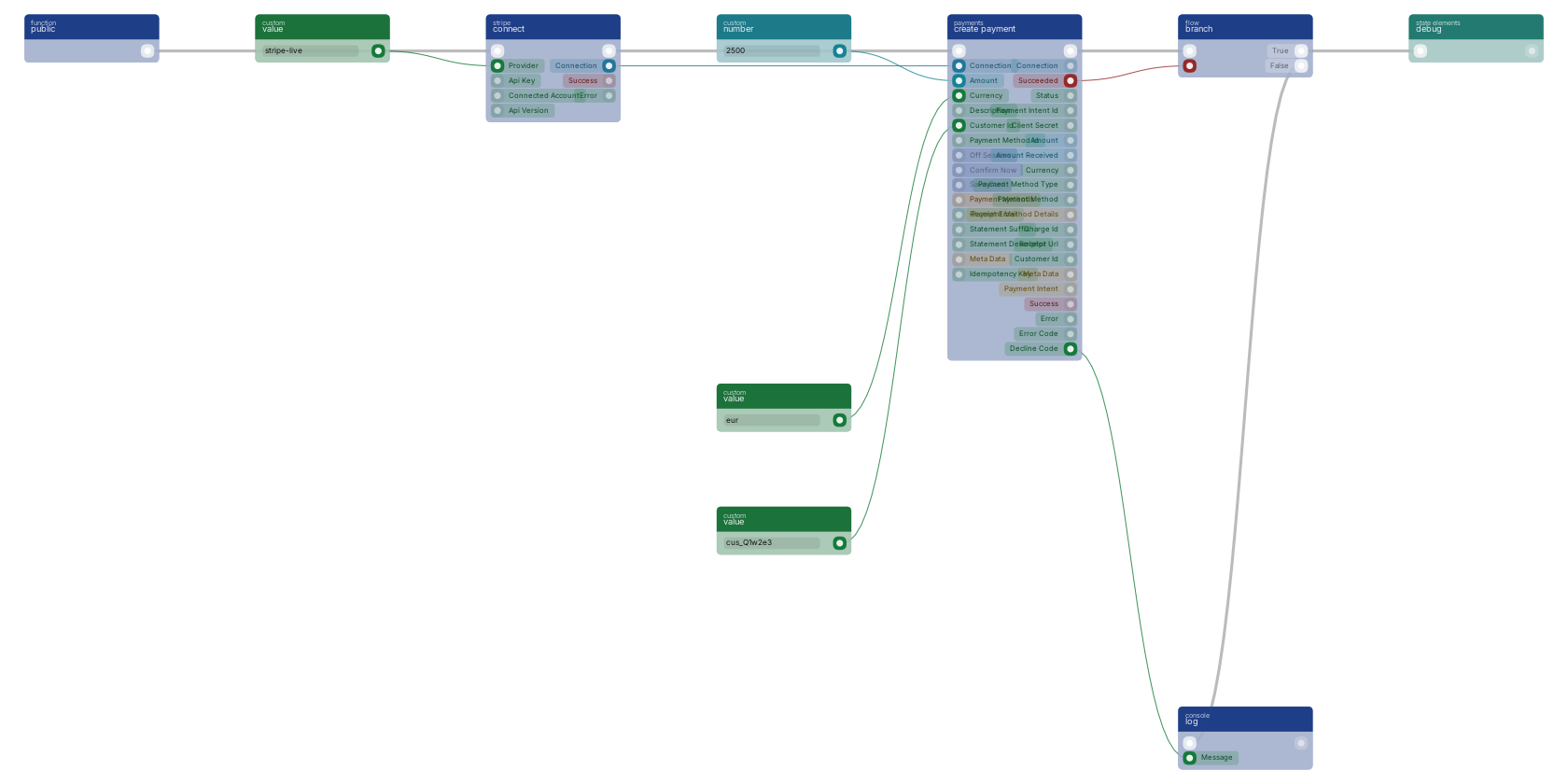
The shape for charging a card the customer already gave you: a renewal, a top-up, a scheduled invoice. create payment intent takes the amount in the smallest currency unit, so 2500 is EUR 25.00 and not 2500 euros. The succeeded pin is the one to branch on rather than success: success means the API call worked, succeeded means the money moved. When the card needs the cardholder present, status comes back requiring action instead, and decline_code tells you which excuse the bank gave.
Version history
Introduced in v15.0.0.
Service documentation
External API reference This block wraps a third-party service. Click here for the service's own documentation of the underlying endpoint.Back to
stripe Return to the main group to view all sub-groups Back to payments Return to the group to view all blocks within this group