if
This block is part of the date group and was last modified in core v10.4.28.
if v10.4.28 Allows you to use different dates based on your given condition (true/false).
In pins 3
- true required
dateThe date to use when the condition is true.
- false required
dateThe date to use when the condition is false.
- boolean required
conditionThe boolean condition that determines which date to use (true or false).
Out pins 1
- date
dateThe resulting date based on the condition (true or false).
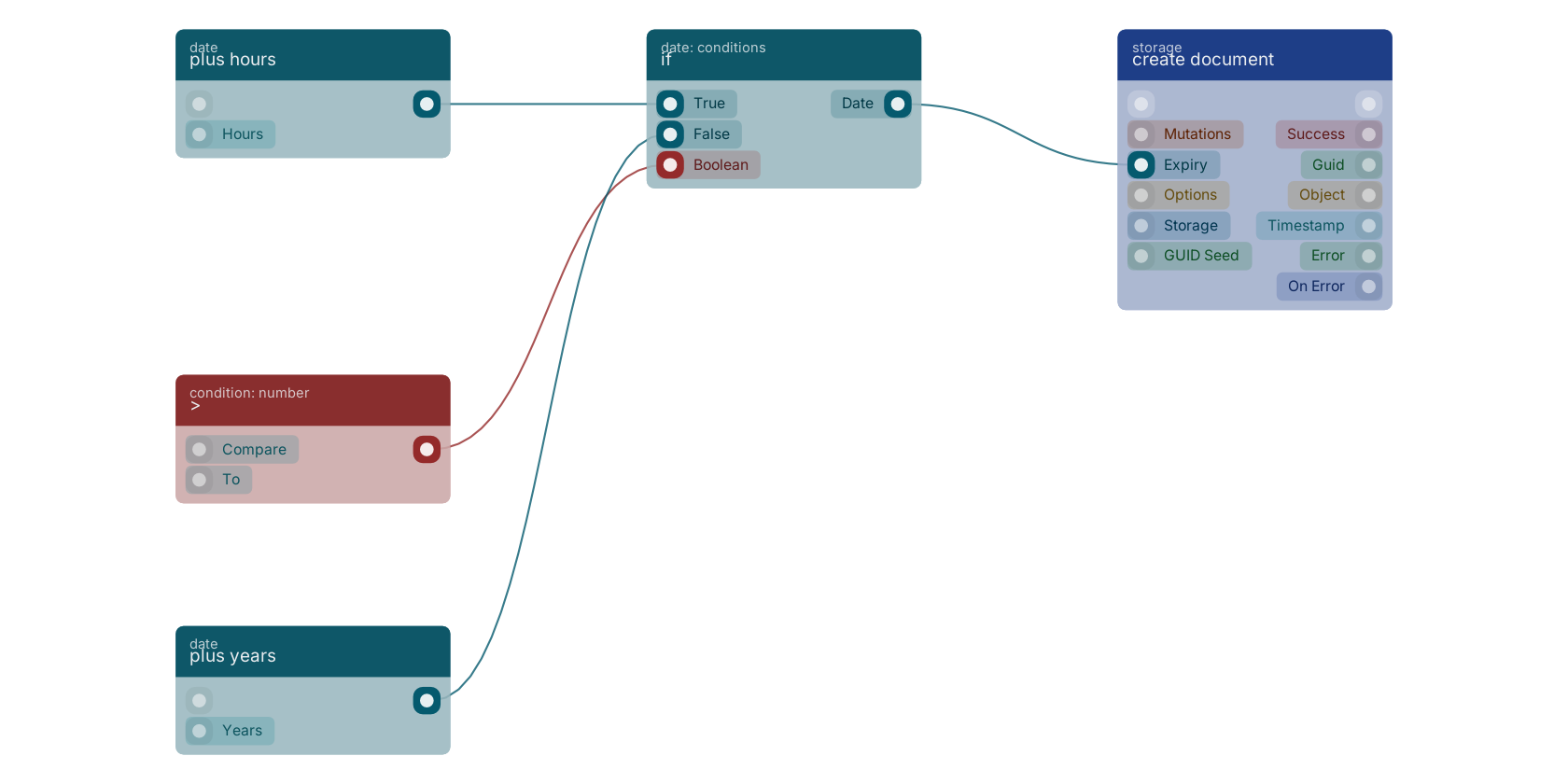
A typical wiring for if: plus hours feeds the then pin; > feeds the condition pin; plus years feeds the else pin; the date out pin feeds create document.
Commonly used with
In production blueprints, this block is most often wired together with:
- plus hours: feeds into this block. Plus an selected amount of hours to your given date.
- create document: this block feeds into it. Creates a document in the given storage.
- >: feeds into this block. returns true if the number is higher.
- is not empty: feeds into this block. checks if the number is filled (not empty).
- plus years: feeds into this block. Plus an selected amount of years to your given date.
- update document: this block feeds into it. Update document in the given storage and creates a revision for it.
Version history
Introduced in v10.4.28.
Back to
date Return to the main group to view all sub-groups Back to date: conditions Return to the group to view all blocks within this group