
generate shipment label
This block is part of the shipping group and was last modified in core v14.0.1.
generate shipment label v13.0.9 Updated v14.0.1This block is used to request the status for a barcode.
- flow
- Connection
postnlconnectionrequiredThe PostNL connection.
- Sender Address
objectrequiredAddress of the sender of this shipment. Object should contain the following fields: city, country_code (ISO2), house_number, street, zip_code, house_number_ext.
- Receiver Address
objectrequiredAaddress of the receiver of this shipment. Object should contain the following fields: city, country_code (ISO2), house_number, street, zip_code, house_number_ext.
- Shipment dimensions
objectrequiredDimensions for this shipment. Object should contain weight field. Fields that you can add are: height, width, length, volume. Check the documentation for the units to use for this fields.
- Printer Type
valuerequiredPrinter type used to print the label. Check documentation for the available types, commonly used
Zebra|Generic ZPL II 200 dpiorGraphicFile|GIF 200 dpi - Confirm Shipment
conditionrequiredIf this boolean is true the shipment will be automaticly confirmed. If
falseyou need to confirm the shipment with the confirm shipment block. - Receiver information
objectThe receiver information for this shipment. Object can contain the following fields: firstname & lastname or company_name, email.
- Sender Contact Person
objectContact person for PostNL for this shipment (from your company). Object should contain the following fields: name or company_name, email.
- Product Code Delivery
valueThe product code delivery for this shipment. Default value is 3085. Check the documentation for the available codes.
- Product Options
arrayv14.0.1Array with objects of options, for example
[{ "OptionCode": "4", "CharacteristicCode": "191" }] - Customer Order Number
valueA unique order number for this order, max. 35 chars
- Your Reference
valueA reference internally used
- Collect Reference
valueA reference used when collecting
- Barcode
valueIf this field is empty an barcode will be generated.
- flow
- Connection
postnlconnectionThe PostNL connection
- Success
conditionIf successful, return true.
- Barcode
valueThe barcode of the shipment.
- Label
objectThe data of the label. The object contains this fields: content (Raw label file content), output_type, label_type
- Request response
objectThe response from PostNL.
- Error
valueError message if the label could not be requested.
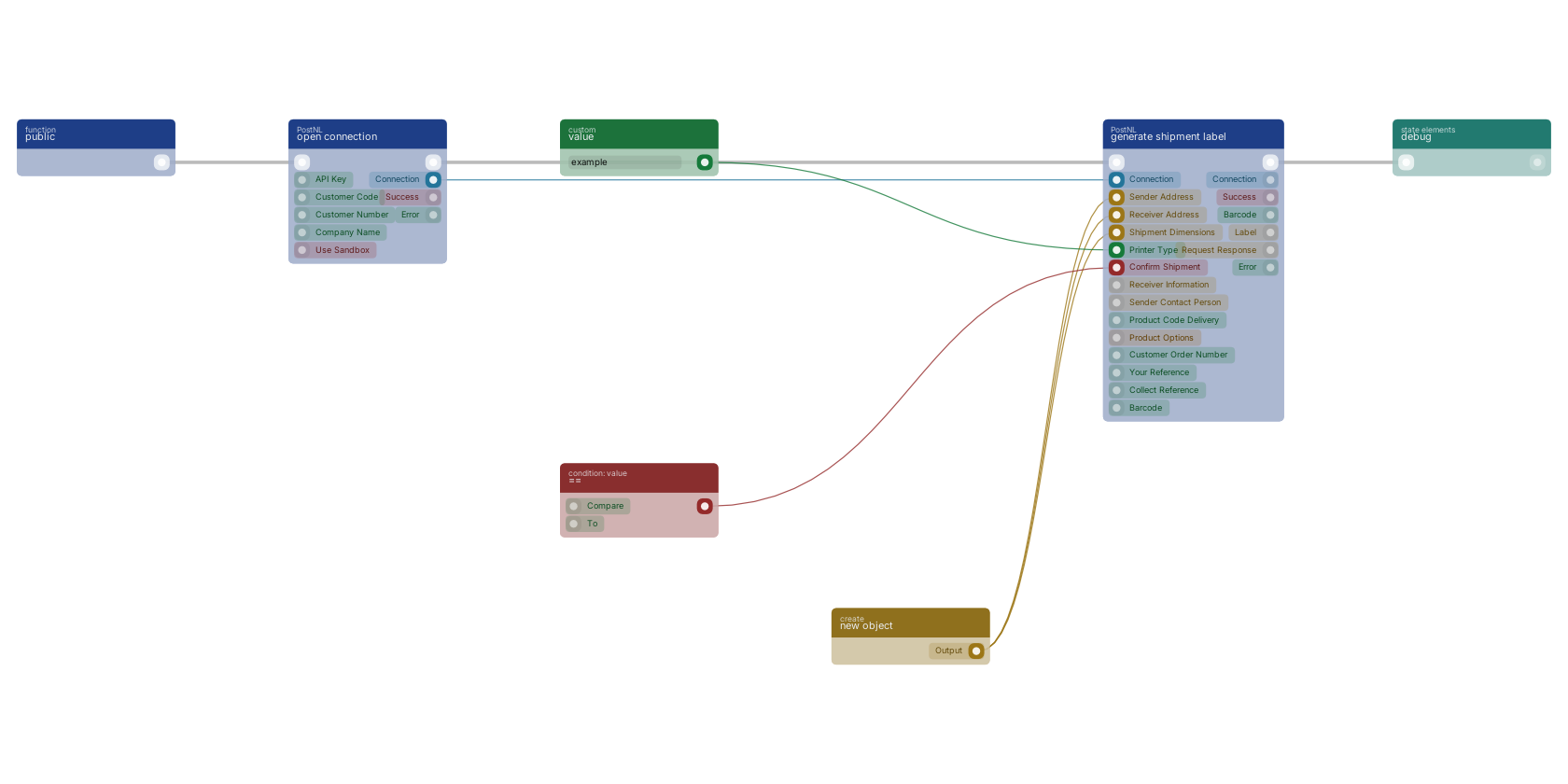
A typical wiring for generate shipment label: a function trigger starts the flow; open connection feeds the connection pin; new object feeds the sender_address pin; new object feeds the receiver_address pin; new object feeds the dimensions pin; value feeds the printer_type pin; == feeds the confirm_shipment pin; the flow out pin feeds debug.
Version history
Introduced in v13.0.9.
Last modified in v14.0.1.
Back to
shipping Return to the main group to view all sub-groups Back to PostNL Return to the group to view all blocks within this group