get document
This block is part of the storage group and was last modified in core v13.0.7.
Storage Selection Required
This block relies on a storage to perform its storage releated actions. You must manually select the storage you want to use in your flow using the storage selector modal. To access the modal, click the white button on the block.
get document v13.0.7 get a specific document based on the given GUID
- flow
flow - guid required
value - Storage required
storage
- found
flow - Object
object - guid
v10.6.2valueThe unique _meta.guid of this document.
- found
conditionIf this condition is
true, the document is found. - Removed
conditionIf this condition is
true, the document is removed. - Accessible
v13.0.7conditionIf this condition is
true, the document is found and not removed.
Fetches one document by guid from the selected storage, following the found flow pin only when it exists. conditionFound mirrors that; removed is true when _meta.removed>0 AND also when the document does not exist at all; accessible is true only when found and not removed. A nil guid, missing storage, or read error outputs object=nil with conditionFound=false and removed=true. Example: unknown guid -> object=nil, conditionFound=false, removed=true, accessible=false.
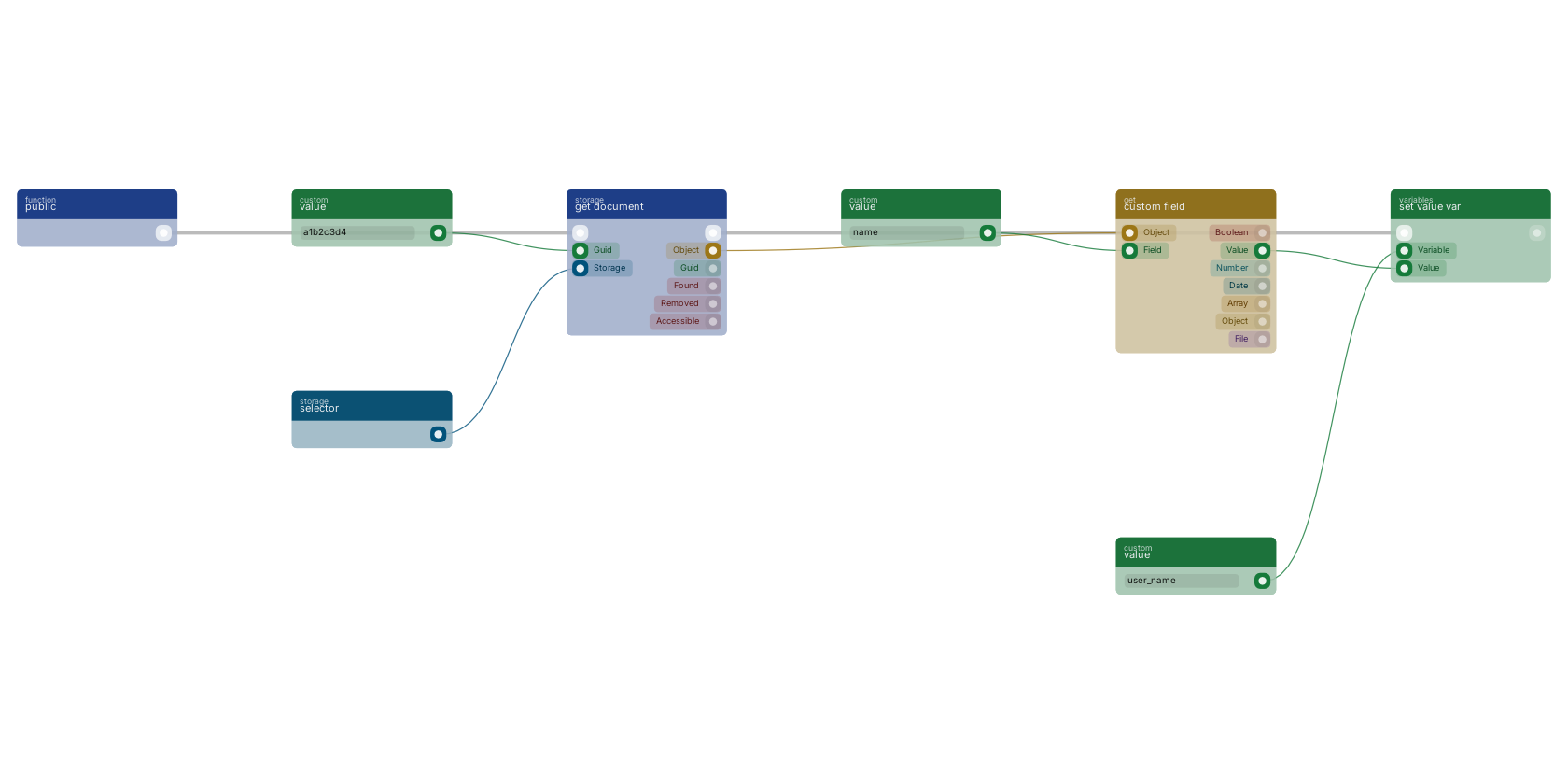
A function trigger starts the flow and get document reads one document: the storage pin takes a storage selector, the guid pin the document id. When found, the found flow continues and the object pin carries the document, from which custom field extracts a single field, stored in a variable with set value var.
Commonly used with
In production blueprints, this block is most often wired together with:
- branch: wired in both directions with this block.
- get fields: wired in both directions with this block. Gets the selected fields from the given object.
- create: feeds into this block. Creates a new function that can be executed using the given name.
- execute: this block feeds into it. Executes the given funcion and waits for it to be executed.
- AND: this block feeds into it. operator for a set of boolean operands will be true if and only if all the operands are true.
- update document: this block feeds into it. Update document in the given storage and creates a revision for it.
Used in these guides
These documentation pages use or explain this block:
- Building a Dashboard with Charts
- Building an API with Locking
- Creating a REST API
- Email System Setup
- Storage Examples
- Storages
- Example: User Management System
- Build Your First CRUD App
Version history
Introduced in v13.0.7.
v10.6.2, click here to see the release notes. Back to
storage Return to the main group to view all sub-groups Back to storage Return to the group to view all blocks within this group