remove document
This block is part of the storage group and was last modified in core v15.0.0.
Storage Selection Required
This block relies on a storage to perform its storage releated actions. You must manually select the storage you want to use in your flow using the storage selector modal. To access the modal, click the white button on the block.
remove document v9.2.5 Updated v15.0.0Removes the given document from the given storage.
- flow
flow - guid required
v10.2.7valueThe documents GUID (unique ID) to remove. • Hidden when other fields are filled
- GUID seed
v15.0.0valueOptional fallback when
guidis not connected: derives the document GUID from this seed exactly likecreate document'sguid_seed(the sha256 of the seed), so a create/remove pair wired to the same raw seed always addresses the same document. Always wire the RAW seed : never the output of thegenerate guidblock, which is already a hash and would be hashed again. • Hidden when other fields are filled - expiry
dateWhen a document is given an expiry date, the document will be unrecoverably deleted on the given date
- update priority
v13.0.6numberA document update can be important for search relevance or not, by poviding the system a priority you can help it understand what updates are high priority (1) and what updates can be delayed without huge impact for search relevance (3). 1 is highest priority, 2 is medium priority, 3 is low priority and 0 is wait-for-insert.
- storage required
storageThe storage this document should be removed in.
- flow
flow - Object
v13.0.8objectThe removed document
- guid
v13.0.8valueThe unique _meta.guid of this document.
- success
conditionReturns
truein case the removal succeeded - error
value
SOFT-deletes the document: it stamps _meta.removed and the data stays recoverable : use permanently delete document for a hard delete. The guid comes from the guid pin, else the guid_seed (same sha256 derivation as create document), else the deprecated object pin's _meta.guid; with none of these it fails with MISSING_DATA. Outputs the removed document and its guid. In simulation nothing is stored : the fetched document is only stamped in memory.
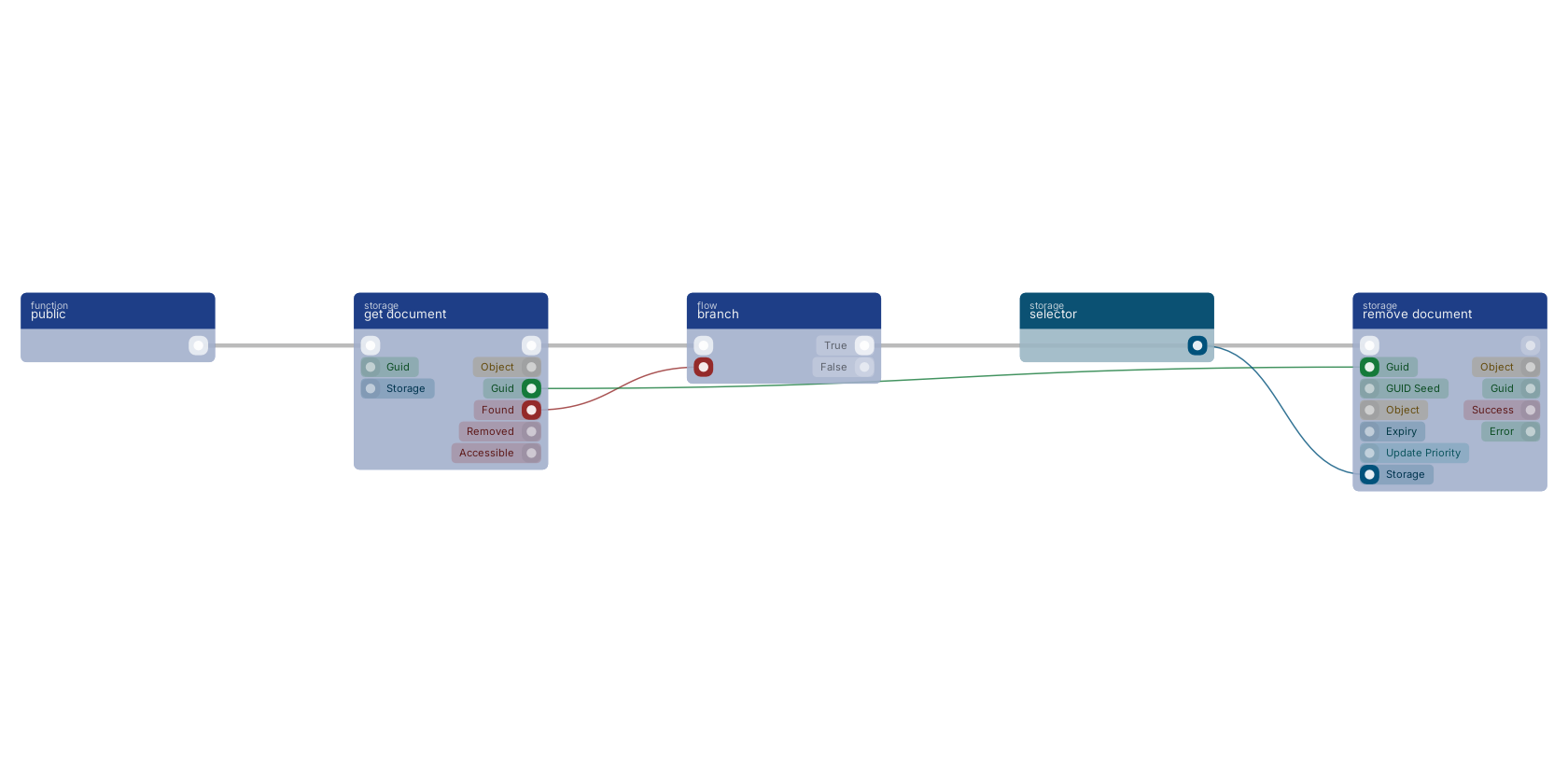
The flow loads a document with get document; only when it was found does the branch send the flow into remove document, with the guid pin carrying the same document. Guarding the delete like this is the common pattern.
Commonly used with
In production blueprints, this block is most often wired together with:
- branch: wired in both directions with this block.
- get fields: wired in both directions with this block. Gets the selected fields from the given object.
- date now: feeds into this block. Gives you the current date based on your timezone.
- reply in JSON: this block feeds into it. Reply to any httpconnection as JSON body.
- get document: feeds into this block. get a specific document based on the given GUID.
- search single: feeds into this block. searches in the given storage based on a query and returns maximum one result.
Used in these guides
These documentation pages use or explain this block:
Version history
Introduced in v9.2.5.
Last modified in v15.0.0.
v13.0.8, click here to see the release notes. v13.0.6 This block or one of its pins was updated in v13.0.6, click here to see the release notes. v10.2.7 This block or one of its pins was updated in v10.2.7, click here to see the release notes. Back to
storage Return to the main group to view all sub-groups Back to storage Return to the group to view all blocks within this group