update multiple documents
This block is part of the storage group and was last modified in core v13.0.8.
Storage Selection Required
This block relies on a storage to perform its storage releated actions. You must manually select the storage you want to use in your flow using the storage selector modal. To access the modal, click the white button on the block.
update multiple documents v9.2.5 Updated v13.0.8Updates multiple documents in the given storage
- flow
flow - array required
arrayAn array of objects or GUIDs representing existing documents.
- mutations required
mutations - expiry
dateWhen a document is given an expiry date, the document will be unrecoverably deleted on the given date
- options
objectProvide
skip_revisionsto update these documents without creating revisions orskip_on_savedto skip the on-events for this document update. - update priority
v13.0.6numberA document update can be important for search relevance or not, by poviding the system a priority you can help it understand what updates are high priority (1) and what updates can be delayed without huge impact for search relevance (3). 1 is highest priority, 2 is medium priority, 3 is low priority and 0 is wait-for-insert.
- storage required
storageThe storage these documents should be updated in.
- flow
flow - success
condition - error
value - failed updates
array - documents
v13.0.8arrayAll the recently updated documents
Applies the same mutations to every document whose GUID is in the array pin (items may be GUID strings or objects with _meta.guid). Unlike the single-document block this keeps going past failures: success=false when one or more GUIDs failed, with those GUIDs listed on failed_updates and the successfully updated documents (without _meta) on documents. An empty or unresolvable array is success=true with nothing done. Missing storage gives success=false with error MISSING_STORAGE. Simulation reports success without writing.
update multiple |
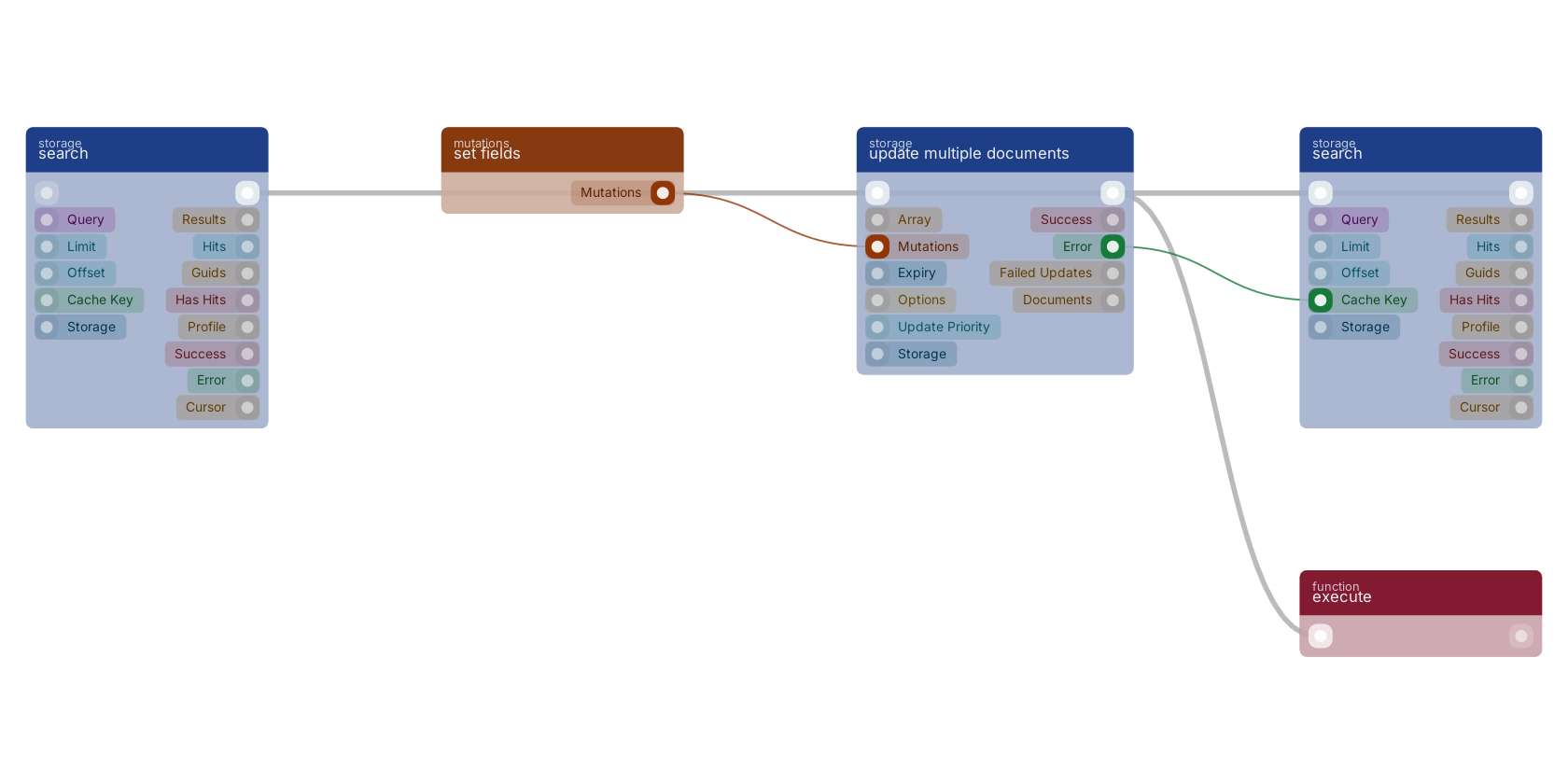
A typical wiring for update multiple documents: search feeds the flow pin; set fields feeds the mutations pin; the flow out pin feeds execute; the error out pin feeds search.
Commonly used with
In production blueprints, this block is most often wired together with:
- search: wired in both directions with this block. searches in the given storage based on a query.
- set fields: feeds into this block. Generates an array of mutations based on the given filled fields.
- branch: wired in both directions with this block.
- execute: this block feeds into it. Executes the given funcion and waits for it to be executed.
- multiple: feeds into this block. combine multiple mutations into one.
- funnel: this block feeds into it.
Version history
Introduced in v9.2.5.
Last modified in v13.0.8.
v13.0.6, click here to see the release notes. Back to
storage Return to the main group to view all sub-groups Back to storage Return to the group to view all blocks within this group