reply in json
This block is part of the json group and was last modified in core v15.0.0.
Type Selection Required
This block requires you to select the data type you want to work with. You must manually select the type using the type selector modal. To access the modal, click the white button on the block.
Field Selection Required
This block requires field selection (in). You must manually select the fields you want to work with using the field selector modal. To access the modal, click the white button on the block.
reply in json v15.0.0 Reply to any httpconnection as JSON body
- flow
flow - connection required
httpconnection - code required
numberHTTP Status Code to return on this response.
- type
valueSets the Content-Type HTTP header.
- Headers
array<object>Custom HTTP Headers to set, Array of Objects [{ key: Value, value: Value }]
- fields
v15.0.0array<value>Response whitelist: dot-paths of the fields the body may carry (e.g. ["name", "_meta.guid"]). Everything not listed is stripped before sending; on an array body the whitelist is applied to each element. Empty or unconnected sends the body as-is. Whitelist on the reply, not blacklist in the flow: a field added to the storage later is then withheld by default instead of leaked by default.
- flow
flow - connection
httpconnection
Sends the body pin as a JSON response: Content-Type application/json, status from the code pin (default 200). The body pin is the one matching the block's selected field type, falling back to data; an unwired body sends an empty object {}, never null. A wired fields pin whitelists dot-paths : only listed paths ship (applied per element on array bodies); empty or unwired sends the body as-is. The response flushes immediately mid-flow and the flow keeps running detached from the request deadline; an unwired or nil connection sends nothing and outputs nil.
reply with json |
return json |
api reply |
reply json |
json return |
json |
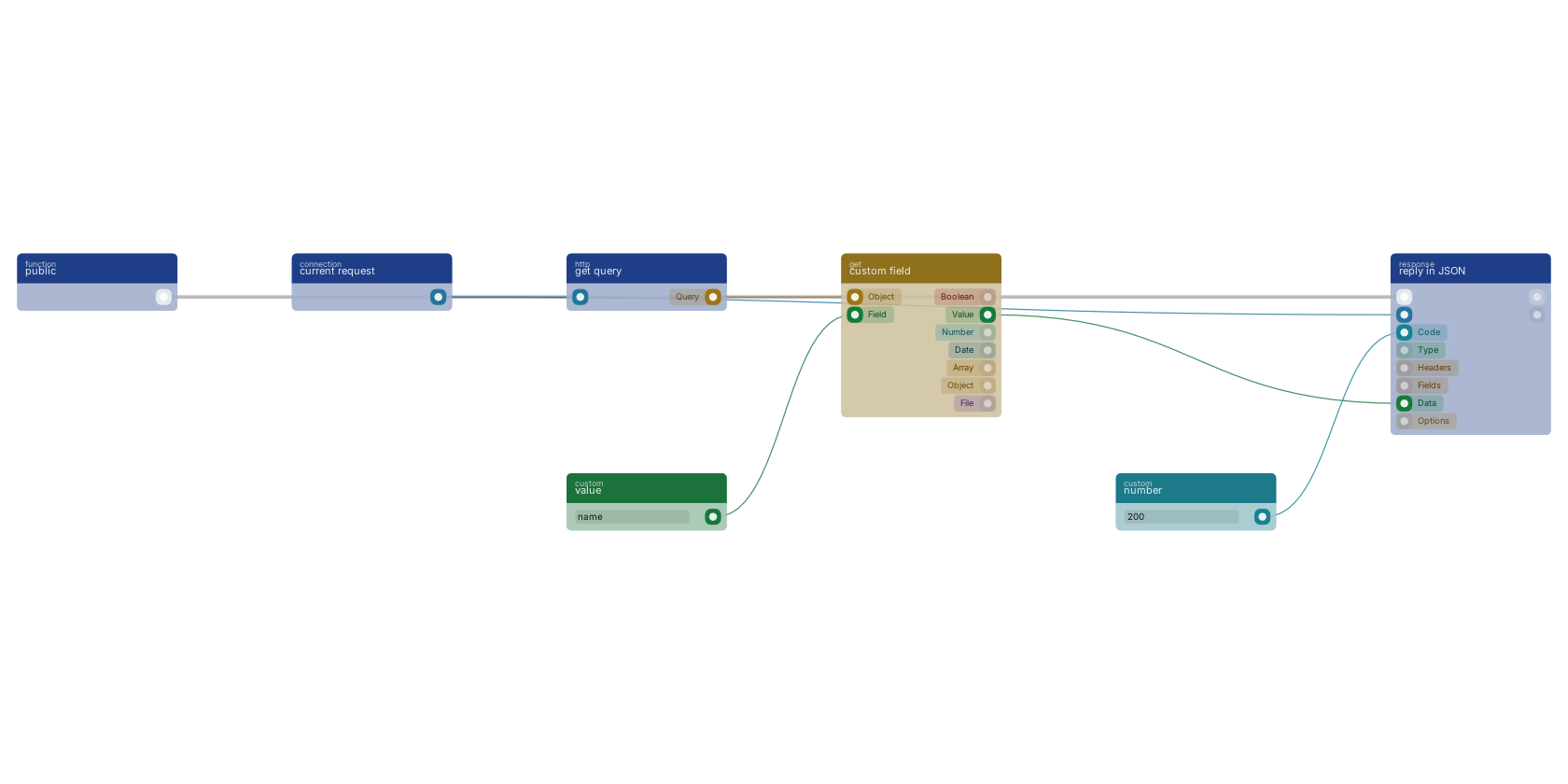
A function trigger starts the API flow, which ends in reply in JSON. The connection pin takes the current request, the code pin a status number, and the data pin the payload. The payload is read out of the request query here: get query hands the query object to custom field, which extracts the name.
Commonly used with
One of the most-used blocks across production blueprints. It is most often wired together with:
- number: feeds into this block. Generates a valid number from the filled custom value in the blueprint.
- current request: feeds into this block. Retrieves a reference to the current HTTP Connection.
- new object: feeds into this block. Builds a new object filled with the given fields.
- branch: feeds into this block.
- search: feeds into this block. searches in the given storage based on a query.
- update document: feeds into this block. Update document in the given storage and creates a revision for it.
Used in these guides
These documentation pages use or explain this block:
- Building a Login Page
- Building AI Endpoints
- Creating a REST API
- Handling City Filter Uploads
- Common Blueprint Patterns
- Block Templates, Combinations That Work
- Quickstart
- Block Quick Reference
Version history
Introduced in v15.0.0.
v13.0.5, click here to see the release notes. v9.4.4 This block or one of its pins was updated in v9.4.4, click here to see the release notes. Back to
json Return to the main group to view all sub-groups Back to response Return to the group to view all blocks within this group